
Picking a Clip Tool for In-House Brand Teams

For an in-house brand team, the right clip tool is the one with the strongest governance, not the best AI: it should lock your template, enforce your fonts and logo, hold clips behind a review step, and keep one workspace consistent across every channel. On that test, Opus Clip Business leads on enterprise controls (SSO, SOC 2), Veed leads on team review, QuickReel leads on consistency-per-dollar, and Vizard sits in between. The choice turns on whether you need documented compliance and SSO, or just every clip to look identical without policing it.
This is a different buying question than a creator or an agency faces. A solo host optimizes for speed and fewest manual touches; an agency optimizes for managing many clients in separate workspaces. A brand team's risk is an off-brand clip, wrong font, missing logo, a caption that reads like marketing didn't write it, going live on a channel the CMO watches. The tool's job is to make that mistake hard to make. So we scored these tools on governance, not on which one finds the best moment.
What "brand governance" means in a clip tool
Brand governance is the set of controls that stop an off-brand clip from being created or posted. Five of them matter to an in-house team: a locked template every clip inherits, font and logo enforcement an editor can't override, an approval gate before publishing, role and access control (who can edit, who can only review, plus SSO for IT), and multi-channel consistency so a clip posted to LinkedIn matches the one on TikTok.
Most AI clippers nail the first half of clip creation, detection. Run the same episode through several and they surface roughly the same set of moments; the practical rule reviewers use is that modern tools find about the same 80% (a directional benchmark, not a measured one). Where they diverge sharply is governance. A creator tool assumes one trusted person makes and posts everything. A brand team has a designer who owns the look, a social manager who schedules, and a legal or comms reviewer who has veto power. The controls below are what bridge that gap, and they are the reason a $9 creator plan and a custom enterprise quote can both be "the right tool" depending on who you are.

The verdict: who should pick what
Four tools are worth a brand team's shortlist. Here is the short version before the detail.
- Pick Opus Clip Business if you need formal enterprise controls, SSO, software license management, custom onboarding, unlimited seats, and you have budget for a custom quote.
- Pick Veed if a shared team review loop (timestamped comments, a reviewer seat) on a self-serve plan is your priority, its Studio tier adds review mode without a sales call, though it stops short of an audited approval record.
- Pick QuickReel if your priority is every clip looking identical across many channels at a low per-seat cost, and a lightweight shared review beats a formal gate.
- Pick Vizard if you want a shared brand kit and approval workflows at the enterprise tier, with a free tier to pilot first.
Every one of these still needs the honest caveat that no AI clipper removes: clips come out needing roughly 20–40% human review of the cut and caption, a reviewer rule of thumb across the category, not a vendor promise. Governance controls that review, it doesn't eliminate it. The tools that win for a brand are the ones that route the review through the right person before the clip goes out.
The brand-governance scorecard
We scored each tool on the five controls, from the live pricing and help pages on 27 June 2026. This is the information a feature list won't give you in one place: not "does it have brand templates" but "can an editor break the brand, and is there a gate before a clip ships."
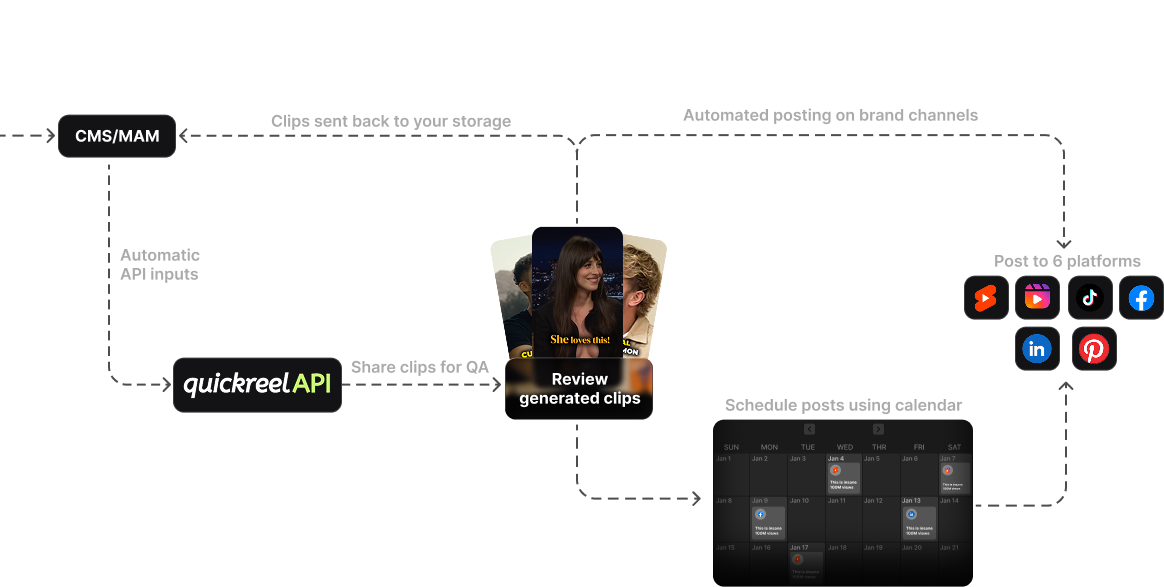
The pattern is clear. If your blocker is IT and compliance, SSO, SOC 2, role separation, Opus Clip Business is built for it, with Veed's Enterprise tier as the per-seat alternative (its SSO lives there, not on the self-serve Studio plan). If your blocker is a shared review loop without a sales call, Veed Studio is the cleanest self-serve answer. If your blocker is drift across channels, the same clip looking different on six platforms because six people exported it, QuickReel's single-workspace model is the strongest, because clip, caption, and schedule happen in one place rather than across exported files.

Side-by-side: governance, seats, and price
Prices and feature tiers verified live on 27 June 2026. SaaS pricing changes, Veed restructured its tiers (Creator / Pro / Studio / Enterprise) since older guides were written, so confirm each vendor's page before you buy.
| Tool | Team plan & price | Governance & template ceiling |
|---|---|---|
| QuickReel | Pro+ $49→$29.40/mo (2 seats); Ultimate $259→$89/mo (10 seats) | 5 templates (Pro+) → unlimited (Ultimate); 30 platforms in-app; review informal |
| Opus Clip | Pro $29/mo (owner + 2 seats, to ~4–6 with packs); Business custom | 2 brand templates on Pro (5 shared in the team workspace); Business adds SSO, SOC 2 Type II, license management, custom onboarding |
| Veed | Pro $21/mo per seat (to 3 editors); Studio $35/mo per seat (5 editors + 1 reviewer); Enterprise custom | Multiple brand kits (Pro); review mode at Studio; SAML SSO at Enterprise only |
| Vizard | Business per seat (free tier to pilot); enterprise custom | Brand kit (custom fonts + templates); approval workflows + brand-kit governance at enterprise |
Sources: QuickReel pricing, Opus Clip pricing, Opus plans & credits help doc and eesel's Opus breakdown, Vizard pricing and Vizard Business billing, Veed pricing summary (CheckThat).
Two numbers on that table need a flag. First, Opus Clip's Pro tier starts at the owner plus two seats and scales only to about four-to-six with add-on packs, so a marketing team beyond that is pushed to a custom Business quote whether or not it needs the enterprise features (eesel, Opus help). Second, Veed bills per seat on every paid plan, so a five-person Studio team lands at roughly $175/mo at $35/seat (CheckThat), and its SSO sits behind a custom Enterprise quote, not the self-serve tiers.
The honest section on each tool
QuickReel, strongest multi-channel consistency per dollar
QuickReel's brand advantage is structural: one episode goes in, captioned vertical clips come out on a locked template, and you schedule them to up to 30 platforms without exporting and re-uploading. That single-workspace model is exactly what keeps clips consistent across channels, the drift that happens when six people export six files and tweak captions never starts, because nobody exports. Brand templates scale from 1 (Starter $9) to 5 (Pro+ $49→$29.40, 2 seats) to unlimited (Ultimate $259→$89, 10 seats), with 20+ languages and 12+ caption styles throughout (QuickReel pricing).
What it is not, today, is a formal-compliance tool. Its review step is lightweight, a shared workspace, not an enforced approval gate with a named reviewer's sign-off, and it does not advertise SSO or SOC 2 on the public page. A regulated brand whose legal team requires a documented approval trail and SAML login should shortlist Opus Clip Business or Veed instead. For the more common case, a marketing team that mostly needs every clip to look the same and ship fast across many channels, QuickReel does the most for the least.
Opus Clip, strongest formal enterprise controls
Opus Clip is the choice when IT and compliance own the decision. Its Business tier carries the controls a creator tool skips: SSO, software license management, custom onboarding, a Master Service Agreement, and unlimited seats, on top of the SOC 2 Type II posture Opus reports across its plans (eesel, Opus help). Pro at $29/mo supports custom font uploads to the asset library, which help on-brand captioning, plus social scheduling and clip analytics.
The catches are real. Pro ships only 2 brand templates (5 if you build them as shared templates in the team workspace) and starts at the owner plus two seats, scaling to roughly four-to-six with packs, so a larger brand team is pushed to a custom Business quote, and Business pricing requires a sales conversation, so it is not a self-serve number you can budget from the page (Opus Clip pricing, eesel). If you need formal governance, Opus is built for it; if you need a lot of distinct brand templates cheaply, its template ceiling is low until you pay for enterprise.
Veed, strongest self-serve team review loop
Veed is the pick when a shared review step, drop in a clip, collect timestamped comments, get a sign-off, is the requirement and you want it without a sales call. Its review mode (comments and feedback, used as the approval loop) lands on the Studio tier at $35/mo per seat, which covers up to five editors plus one reviewer seat (CheckThat). Pro at $21/mo per seat carries multiple brand kits but not review mode; the lower Creator tier has only limited brand-kit access.
Three honest caveats. First, Veed bills per seat on every paid plan, so cost scales linearly, a five-editor Studio team is around $175/mo. Second, its review layer is comments and link-sharing, not an audited approval record, there's no formal version stacking or documented "who approved what, when," so a regulated brand that needs a defensible sign-off trail will still want a dedicated proofing tool. Third, SAML SSO sits on Enterprise (custom quote), not the self-serve Studio plan, so IT-mandated single sign-on means a sales call after all. It is also a general video editor first and a podcast clipper second, its auto-clipping is competent but not its headline feature the way it is for Opus Clip or QuickReel. Buy Veed for the review loop, not for the sharpest clip detection.
Vizard, shared brand kit with a generous pilot tier
Vizard sits between the consistency play and the enterprise play. Its Business plan includes a shared workspace, a brand kit with custom fonts and templates, and support for up to 20 social accounts, and its enterprise tier adds approval workflows and brand-kit governance (Vizard pricing, Vizard Business billing). The standout for a brand team that wants to test before committing is the free tier, 60 credits a month, enough to pilot the look on real episodes, though it watermarks exports and caps at 720p, so it is a trial, not a home.
Where it lags the leaders: its approval and role controls live mostly at the enterprise tier rather than self-serve, and seat pricing has shifted across snapshots (reported from $5/seat add-ons up to a $30/seat Team plan), so verify the current structure before you size a budget (Vizard pricing). For a brand team that wants a shared brand kit and a low-risk pilot, Vizard is a fair starting point; for enforced governance, the controls you want are behind the custom tier.
When to choose each, the decision rule
Read the rule top-down by your real blocker. If procurement won't sign without SSO and a SOC 2 report, the conversation starts and ends at Opus Clip Business (or Veed's custom Enterprise tier). If your problem is that clips drift off-brand because there's no review step, Veed Studio's review loop is the cleanest self-serve fix, just know it's comments and sign-off, not a documented approval record. If neither is a true blocker and you mostly need a designer to set the template once and have every clip inherit it across every channel, QuickReel gives you the most consistency per dollar, and Vizard's free tier lets you pilot the look before anyone signs a contract.
For teams weighing seats and shared review more broadly, what multi-seat clip tools should compare goes deeper on the seat math, and if you're still deciding whether to pay at all, the real tradeoffs between free and paid clip tools covers the watermark question that matters more for a brand than for a creator.
FAQ
What's the difference between a clip tool for a brand and one for a creator? A creator tool optimizes for one trusted person making and posting everything fast. A brand tool adds governance: a locked template an editor can't override, an approval step before publishing, and role separation so the designer owns the look and the reviewer owns the veto. The detection quality is similar; the controls are not.
Which clip tool has the best brand template controls? For unlimited templates at a low seat cost, QuickReel's Ultimate tier (unlimited templates, 10 seats) leads; for enforced enterprise governance around those templates, SSO, SOC 2, license management, Opus Clip Business leads, with Veed's Enterprise tier the per-seat alternative (QuickReel pricing, eesel, CheckThat). Pick by whether your constraint is template volume or compliance.
Do brand teams need an approval workflow in the clip tool itself? If a legal or comms reviewer must sign off before clips go live, an in-tool review step helps, Veed's Studio review mode (timestamped comments, a reviewer seat) is the strongest self-serve version, though it's a comment loop, not an audited record. A small team that self-reviews can rely on a shared workspace plus a locked template instead.
How much should an in-house team budget per month? Self-serve team plans run from QuickReel's Pro+ at $29.40/mo (2 seats) to Ultimate at $89/mo (10 seats), Opus Clip Pro at $29/mo (owner plus 2 seats), and Veed's per-seat plans, Pro $21/seat, Studio $35/seat, so a five-person Studio team is around $175/mo (QuickReel, Opus Clip, CheckThat). Enterprise tiers are custom quotes.
Will an AI clip tool keep our brand consistent on its own? Partly. A locked template keeps the frame, fonts, and logo consistent automatically, but every AI clipper still needs roughly 20–40% human review for the cut and caption accuracy, a directional rule of thumb across the category, not a measured figure. Governance controls who does that review and when, it doesn't remove the review itself.
The bottom line for a brand team
Score clip tools on governance, not on whose AI finds the best moment, detection has converged, and the brand risk lives in the steps after it. Decide by your hard blocker: compliance and SSO point to Opus Clip Business; a self-serve shared review loop points to Veed Studio; consistency across many channels at the lowest per-seat cost points to QuickReel, with Vizard a fair way to pilot first. Clips do move real numbers for a brand, they drive 20–40% of new audience for video shows and can raise reach 2–5× (Podcast Studio Glasgow, a production studio, so treat the range as directional rather than a controlled study), but only if every clip that ships looks like it came from the same company. That is the entire reason to buy for governance instead of for the cleverest AI. Compare the agency buying lens, which optimizes for many client workspaces, and you can see why the brand-team criteria are their own thing. If detection quality is still part of your shortlist, our head-to-head on AI clip generators covers which tools find the strongest moments before governance enters the picture.