
Multi-Seat Clip Tools: What Teams Should Compare

When a team buys a clip tool, the feature that decides it is rarely the clipping. It is whether two editors can work the same episode without overwriting each other, whether a junior can post without an admin's sign-off, and whether the bill climbs with people in a way you can predict. Score multi-seat tools on five axes a solo review never touches, role permissions, shared brand kits, seat-pricing model, concurrent editing, and audit trails, and the field narrows fast. QuickReel and Vizard's team tiers fit small content teams cleanly; Opus Clip suits a tight pod that stays inside its self-serve seat ceiling; Descript fits teams that also want a real editor in the same workspace.
Detection quality is not the deciding factor here, the same way it isn't for a solo creator. After editing thousands of clips across these tools, the honest read is that modern clippers land on most of the same moments, the gap between them is small enough that no team should pick on detection alone. For a team, the variable that costs you money and Slack threads is the workspace, how people share work, divide it, and avoid stepping on each other. So this comparison ignores who finds the best moment and scores who runs the cleanest shared workflow.
The five-axis team scorecard
A solo-creator clip review ranks tools by touches per episode and price. None of that survives contact with a team. The moment you have a second person, five new questions appear that a one-person review has no reason to ask.
Read these as a checklist, not a leaderboard. A two-person pod that trusts each other can ignore permissions and audit trails and buy on price. A ten-person agency posting to client accounts cannot, for them, axes 1 and 5 outrank everything else. Match the axes to your actual structure before you weigh any tool.

Axis 1, role permissions
The question: can different people have different powers? A team needs at least two roles, someone who edits and someone who approves and posts. The strongest tools add a third: a viewer or client role that can comment on a single project without touching anything else. Without roles, every seat is an admin, which is fine for two trusting people and a real risk once a freelancer or client has a login.
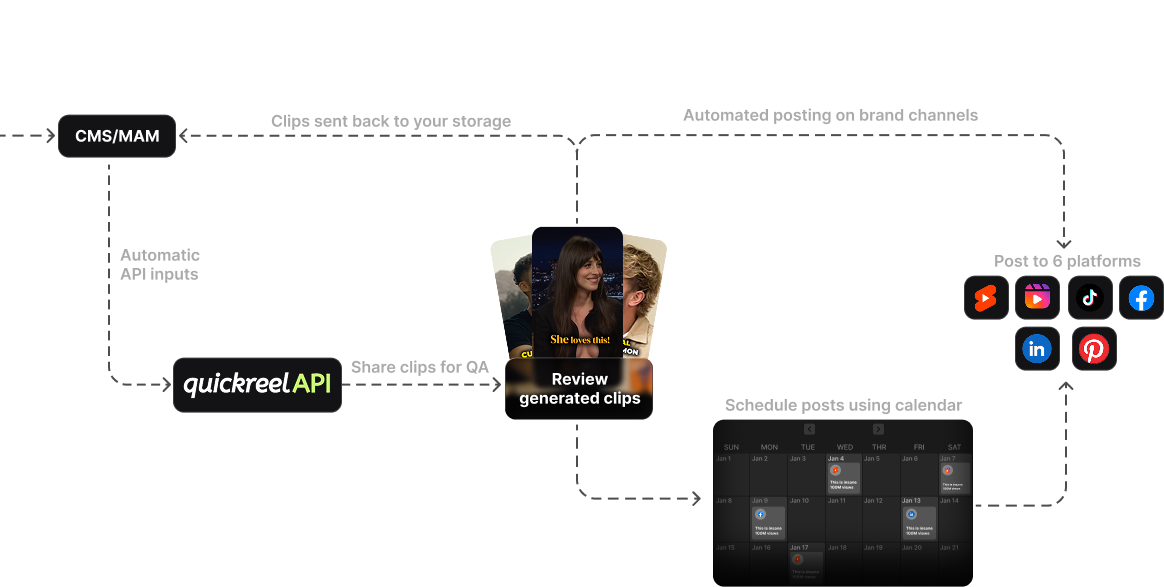
Here the tools split by intent. Descript's Business tier carries genuine role permissions and a shared team drive with workspace-level access control, built for media teams where who-can-touch-what matters; note that full SSO and SCIM provisioning sit on its Enterprise tier, not Business (Descript pricing). Vizard's Business tier runs a shared workspace where you add editor seats and invite external viewers, clients or contractors, to specific projects only, which gets you the edit-versus-view split most teams want, short of a full permissions matrix (Vizard pricing). Opus Clip's team workspace shares assets and templates across seats but its access model is lighter than a true permissions matrix; SSO lives on its custom-priced Business tier (Opus Clip plans). QuickReel's team workspace shares projects and brand assets across its seated plans; for granular role governance beyond a small team it points you to its Team/Enterprise contact path (QuickReel pricing).
If you post to client accounts, treat real role permissions as the entry requirement, not a nice-to-have. The cost of a wrong-account post is a client, not a clip.
Axis 2, shared brand kits
The question: does one brand kit serve every seat, or does each person re-upload fonts and re-pick caption styles? A shared brand kit is the difference between five editors producing one consistent look and five editors producing five slightly different ones. For an agency running several clients, it is also how you keep client A's font off client B's clip.
A shared brand kit is the clearest tier-gate in this whole category. On Vizard, the brand kit, custom fonts, brand templates, consistent styling across content, lives on the Business tier, not Creator (Vizard pricing; EzUGC). Descript's Brand Studio is a Business-tier, team-wide feature (Descript pricing). Opus Clip includes multiple brand templates in its Pro team workspace (Opus Clip plans). QuickReel scales brand templates by tier, three on Pro, five on Pro+, and unlimited on Ultimate, so a multi-client team that needs a kit per client wants the top tier (QuickReel pricing). Count your brands before you count your seats: a five-client agency needs five kits, and that requirement often picks your tier for you.

Axis 3, seat-pricing model (the one that surprises finance)
The question: how does the bill behave when you add the fourth person? There are three models in this market, and they scale very differently. This is where teams overpay, because the entry price tells you almost nothing about the cost at five seats.
The models in practice:
- Per-seat (Descript; Vizard additional seats). Descript bills per editor, Business runs about $50/seat/mo annual, $65 monthly, each seat carrying its own media-hour allowance (Descript pricing). Five editors is five times one. Predictable, and the most expensive line as you grow.
- Seat-pack bundles (Opus Clip). Opus's Pro plan is $29/mo with 2 seats; you add a pack to get +2 seats and +300 credits together. Opus's own plans doc states a ceiling of 4 seats on self-serve Pro (2 base + one pack of 2); one third-party breakdown reads it as room for two packs (6 seats), so confirm your exact cap at checkout. Either way, you cannot buy a seat without the credits or vice versa, and teams that need more seats, SSO, or API access move to its custom-priced Business tier (Opus Clip plans; eesel AI).
- Seats included (QuickReel). A block of seats is baked into one tier price, Pro+ at $29.40/mo includes 2 seats, and Ultimate at $89/mo (currently ~66% off the $259 list, renews at $99) includes 10 seats plus unlimited brand templates and 30 scheduling platforms (QuickReel pricing). Cheapest per seat once you fill the block; wasteful if you only need three of ten.
The rule that falls out of this: per-seat is cheapest when you are small and dishonest about growth; seats-included is cheapest once your team is real. Opus's pack model sits in between and is the one with a documented self-serve ceiling, plan around the seat cap, and if you are near it, price the jump to Business before you commit.
Axis 4, concurrent editing
The question: can two people work the same episode at the same time without one clobbering the other's work? Be precise about what these tools mean by "collaboration." Most dedicated AI clippers do not offer Google-Docs-style live multi-cursor co-editing on a single clip, what they offer is a shared workspace, shared projects, shared assets, and parallel work on different clips from the same source.
The exception worth flagging is Descript, which is a full editor as much as a clip tool: it lists live collaboration and commenting across its paid tiers, so two people can genuinely be in one project together (Descript pricing). The pure clip generators, Opus, Vizard, QuickReel, take the shared-workspace route instead: a shared space where the work is divided by clip rather than co-authored line by line. For a clip program that distinction barely matters, because the realistic team pattern is one episode in, several editors each claiming different clips out of it, not two people dragging the same caption at once. So when a clip vendor says "collaboration," read it as "shared workspace," and design your workflow as parallel ownership of separate clips. That is the model the clip-first tools actually support.
Axis 5, audit trails
The question: when a wrong clip goes to the wrong account, can you see who did it and roll it back? For a two-person show this is overkill. For a team posting to clients or a brand with compliance review, it is the axis that keeps you employed. You want version history, a record of who changed what, and ideally a log of who posted which clip where.
This is the thinnest axis across the category, and saying so is the honest read. Descript carries the strongest story, a shared team drive with admin-controlled workspaces and role permissions on Business, with full SSO/SCIM and the heaviest security controls reserved for its Enterprise tier (Descript pricing). Vizard's Business workspace gives you scoped external-viewer access, so a client or manager can review inside a single project before a clip ships, but that is a review gate, not a full change log (Vizard pricing). Most clip tools, including the lighter team tiers across the board, do not expose a full who-posted-what audit log; they give you shared projects and admin-side controls, and the posting record itself lives in each social platform. If a true audit trail is a hard requirement, regulated industry, client SLAs, shortlist on this axis first and accept that it likely pushes you to a Business or Enterprise tier and a sales call.
Side-by-side: the team-relevant specs
Prices and tier limits verified live on 27 June 2026; SaaS plans change, so re-check each vendor before you buy. This table scores the team axes, not clip quality, which is comparable across all four.
| Tool | Entry team tier & seats | Team-axis strengths |
|---|---|---|
| QuickReel | Pro+ $29.40/mo (2 seats); Ultimate $89/mo (10 seats) | Seats-included pricing, brand templates by tier (unlimited on Ultimate), built-in scheduling to up to 30 platforms |
| Opus Clip | Pro $29/mo (2 seats + seat packs; self-serve ceiling reads as 4–6 by source) | Shared workspace + brand templates; Business tier adds API, unlimited seats, SSO (custom price) |
| Vizard | Business shared-workspace tier (per-seat add-ons) | Brand kit + custom fonts on Business, editor seats plus scoped external-viewer (client) access, 20 social accounts |
| Descript | Business $50/seat/mo annual ($65 monthly), per-seat | Real role permissions, admin-controlled team drive, live collaboration, Brand Studio, plus a full editor in one tool (SSO/SCIM is Enterprise-only) |
Sources: QuickReel pricing, Opus Clip plans/credits and eesel AI's Opus pricing breakdown, Vizard pricing and EzUGC's Vizard analysis, Descript pricing.

When to choose each
- Choose QuickReel if you want seats bundled into a predictable price, scheduling built in, and a brand template per client at the top tier, a small-to-mid content team or a brand running several shows wants Ultimate's 10 seats and unlimited kits (QuickReel pricing).
- Choose Opus Clip if you are a tight pod that will not outgrow its self-serve seat ceiling and you decide what to post by virality score, just confirm the exact seat cap at checkout, since sources read it as either four or six, and plan the jump to Business if you are near it (Opus Clip plans).
- Choose Vizard if you want a shared workspace with editor seats and scoped client-viewer access without jumping to a full media suite, and you clip across languages (Vizard pricing).
- Choose Descript if your team also needs a real editor, live collaboration, and genuine role permissions in one tool, and step up to its Enterprise tier if you require SSO/SCIM, accepting per-seat pricing as the cost of that depth (Descript pricing).
All four carry the same honest caveat every AI clipper does: the suggested clips still need a human review pass before they ship, trimming, reframing checks, caption fixes. For a team that is a feature, not a bug, the review pass is exactly the work you assign across seats. The tool that wins is the one that lets you divide that review cleanly, keep the brand consistent while you do it, and see who shipped what.
Consistency matters for a team for the same reason it matters for a solo show. Publishing cadence is the single biggest predictor of a podcast surviving, and roughly 47% of podcasts stop at three episodes or fewer (Amplifi Media analysis). A team's edge is that seats let you keep shipping when one person is out. A workspace that fights you erases that edge.
How we compared
We scored on the five team axes above, role permissions, shared brand kit, seat-pricing model, concurrent editing, audit trails, not on clip detection, which in our hands-on testing is close enough across modern AI clippers that it should not decide a team purchase. Tier limits, seat counts, and prices were verified against each vendor's live pricing page and corroborating third-party breakdowns on 27 June 2026. Where a vendor's seat or pack pricing is ambiguous (Opus's self-serve seat ceiling reads differently across sources; Vizard's exact per-seat add-on figure was not rendered on the live page), we flagged it rather than guess. SaaS pricing moves; re-verify before you buy.
FAQ
What is the best multi-seat clip tool for a small team? For a small content team that wants predictable cost, QuickReel's seated tiers (Pro+ 2 seats, Ultimate 10 seats) bundle seats into the price; for a team that also needs a full editor and role permissions, Descript's per-seat Business tier fits better (QuickReel pricing; Descript pricing, verified 27 Jun 2026). Match it to whether you buy by block or by person.
How do clip-tool seat prices actually work? Three models: per-seat (you pay for every person, e.g. Descript at $50/seat/mo annual), seat-pack bundles (seats and credits added in fixed steps with a documented self-serve ceiling, e.g. Opus Clip), and seats-included tiers (a block of seats in one price, e.g. QuickReel Ultimate's 10). Per-seat is cheapest when small; seats-included is cheapest once the block is full.
Can two people edit the same clip at the same time? For the pure clip generators, no, Opus, Vizard, and QuickReel offer a shared workspace where editors work different clips from the same episode in parallel, not Google-Docs co-editing on one clip. Descript is the exception: it lists live collaboration across its paid tiers, since it is a full editor as much as a clip tool (Descript pricing).
Which clip tools have role-based permissions? Descript's Business tier carries the clearest role permissions via its admin-controlled team drive, with full SSO and SCIM on Enterprise. Vizard's Business workspace splits editor seats from scoped external-viewer access, covering the edit-versus-view need short of a full matrix. Opus Clip and QuickReel offer lighter shared-workspace models and point larger teams to a Business/Enterprise contact (Descript pricing; Vizard pricing).
Do any clip tools have a full audit trail? A complete who-posted-what audit log is rare across these tools' team tiers. Descript's admin-controlled team drive and role permissions are the strongest here, and Vizard's scoped client-review access on Business adds a checkpoint before a clip ships. If a true audit trail is mandatory, expect a Business or Enterprise tier, a sales conversation, and a contract you should read for the exact logging.
What to buy, in one paragraph
Buy the workspace, not the clipper. Detection is close enough across these tools that it should not decide a team purchase; what separates them is role permissions, a shared brand kit, a seat-pricing model that scales the way your headcount does, honest concurrent-editing expectations, and whatever audit trail your accountability needs. QuickReel and Vizard's team tiers fit most small content teams, Opus suits a small pod that stays under its seat ceiling, and Descript suits teams that want a full editor and real role permissions in one place. Pick the two axes that matter most for your structure, shortlist on those, and verify the seat math on the live pricing page before anyone signs.
If your buyer profile is sharper than "a team," we have the use-case cuts: choosing a podcast clip tool for an agency goes deeper on client-account workflows, picking a clip tool for in-house brand teams covers the single-brand case, and the best clip tool setup for solo podcasters flips the math back to one person. For scale beyond a single team, see the best clip tools for podcast networks, and for the full tested field start with the best AI podcast clip generators and the best Opus Clip alternatives.