
Free vs Paid Podcast Clip Tools: The Real Tradeoffs

Free clip tools are real and some are genuinely good, but "free" is a sticker price, not a cost. The actual cost shows up as a watermark you re-export to remove, a three-day file expiry, an aspect-ratio lock, and a render queue you wait behind. Once you count that friction, most free tiers cost more per finished clip than a $9–$17 paid plan. Here is the ledger.
This page is for the buyer deciding whether to stay free or pay, a solo host, an agency owner pricing a clip program, or a brand team about to commit a budget. I have edited and re-exported enough clips to know exactly where the free-tier tax hides. The verdict up front, then the math.
Free vs paid clip tools: which should you actually use?
Use a free tier if you are testing a tool or clipping fewer than a handful of episodes a month and can publish on the one platform the free plan allows. Pay the moment you need watermark-free exports, more than ~3–4 episodes processed monthly, or scheduling, which is to say, the moment clipping becomes a habit rather than an experiment.
The dividing line is mostly not quality. On most tools the free and paid tiers run the same core clip-detection, so they surface broadly the same moments, paying rarely buys you a smarter clipper (though some tools reserve extras like Opus Clip's virality scoring for paid). What paying mainly buys is a finished, postable clip out the door without a watermark, an aspect-ratio lock, or a three-day fuse. That is the cost free tiers quietly charge.
The hidden-cost ledger: what "free" actually charges you
"Free" never means free. It means the fee is paid in something other than dollars, a watermark on your brand, a re-export at midnight, a clip you lost because it expired, a platform you can't post to. The ledger below converts each free-tier restriction into the real-world cost it imposes. This is the framework the rest of the article runs on.
| Free-tier restriction | What it looks like | The cost you actually pay |
|---|---|---|
| Watermark | A tool's logo burned into the corner | Your brand reads as "made on a free tool," or you waste a re-export/crop to remove it |
| Export cap | "3 clips/month," "1 video" | You ration which moments to ship, or you can't publish a full week |
| File expiry | Clips deleted after 3 days | You download everything immediately or lose work; no back-catalog |
| Aspect-ratio lock | 9:16 only | No square for the feed, no 16:9 for YouTube, one platform, full stop |
| Minutes/credits cap | ~60 min source/month | One ~60-minute episode and you're done for the month |
| Render queue priority | Free jobs run last | Clips arrive hours later, not minutes, batching breaks down |
| No scheduler | Export, then post each by hand | 20–30 manual uploads a week across platforms |
Read down that right column. None of those costs appear on a pricing page, but you pay every one of them. The question is whether paying $9–$17 a month is cheaper than paying them in time and brand damage. For anyone posting consistently, it is.
Watermark: the one that costs you twice
A watermark costs you twice, once in how the clip looks, once in the work to remove it. On free tiers from Opus Clip, Vizard, and most rivals, every export carries the tool's logo (Opus Clip free exports are watermarked; Vizard's free tier watermarks every export). To strip it cleanly you re-export through another editor or crop, which can knock your clip out of safe-zone framing and shrink the speaker. Removing a watermark to publish is, by definition, no longer "free."
On Opus Clip, the watermark disappears at the Starter plan, $15/mo (fluxnote, 2026). On Vizard, it clears at the entry Creator plan, around $20/mo, or roughly $14.50/mo billed annually (Vizard pricing; reviewed figures vary, so confirm at checkout). That is the price of your brand not advertising someone else's tool.
Export caps and expiry: the back-catalog killer
The combination of a low export cap and a short file expiry is what quietly kills a clip habit. Opus Clip's free plan runs on 60 processing minutes a month with clips that expire from storage after three days (Opus Clip plans docs and 2026 reviews via eesel). One 60-minute episode eats the whole month, and if you don't download every clip within 72 hours, it's gone. There is no "clip the back catalog over the weekend" on a free tier, the math forbids it.
True cost per finished clip: the number that actually decides this
"Free" vs "$15" is the wrong comparison. The right one is cost per finished, publish-ready clip, sticker price divided by clips you can actually post, plus the time tax. A free tier stalls at roughly three watermarked, 9:16-only clips a month before the cap and the three-day expiry bite, and each one still needs a re-export to strip the logo, so its real cost per usable clip is steep even at $0. An entry paid plan turns two or three episodes into a few dozen clean clips, which lands the dollar cost around $0.50–$0.70 each and drops the time tax to near zero.
Here is the honest arithmetic. Round numbers, stated assumptions:
The pattern holds across tools: the entry paid plan is usually the cheapest per finished clip, because it removes the watermark, lifts the cap, and stops the clock on expiry. Free is cheapest only if you publish almost nothing, in which case you didn't need a clip tool, you needed a screen recorder.
QuickReel's credit model makes this concrete. 1 credit per source-minute on the AI Clip tool (QuickReel pricing; a 20-minute video costs 20 credits and returns 6–8 clips), and one episode yields several clips, so the Starter plan's 100 credits ≈ two ~50-minute episodes, a couple of weeks of posts from one bill. Opus Clip uses the same input-length model, a 45-minute podcast consumes 45 credits whether it generates 5 clips or 50, because you pay for what goes in, not what comes out (eesel, 2026). Count the clips, not the credits.

Where free is genuinely the right call
Free wins in three honest cases, and pretending otherwise would be a sales pitch, not a comparison.
First, evaluation. A permanent free tier is the best way to test detection quality and the editor's feel before you spend. Opus Clip, Vizard, and QuickReel all let you do this without a card. Use it.
Second, true low volume. If you publish one episode a month and post to a single platform in 9:16, a free tier may genuinely be enough, the cap and the aspect lock only bite when you scale or diversify.
Third, a one-off. Clipping a single keynote or a guest spot you'll never repeat doesn't justify a subscription. Klap, for instance, has historically offered a limited free path for exactly this kind of one-and-done test, though terms shift, verify on their site before relying on it.
Outside those three, the free-tier tax compounds every week you keep posting.
What paid actually buys (beyond removing the watermark)
Paid plans are not just "free without the logo." The features that matter on a paid tier are the ones that change your weekly workflow, not your single-clip output.
- All aspect ratios. Square for the in-feed Instagram post, 16:9 for YouTube, 9:16 for Shorts and Reels, from one render. Free tiers commonly lock you to 9:16 (Opus Clip free is 9:16 only).
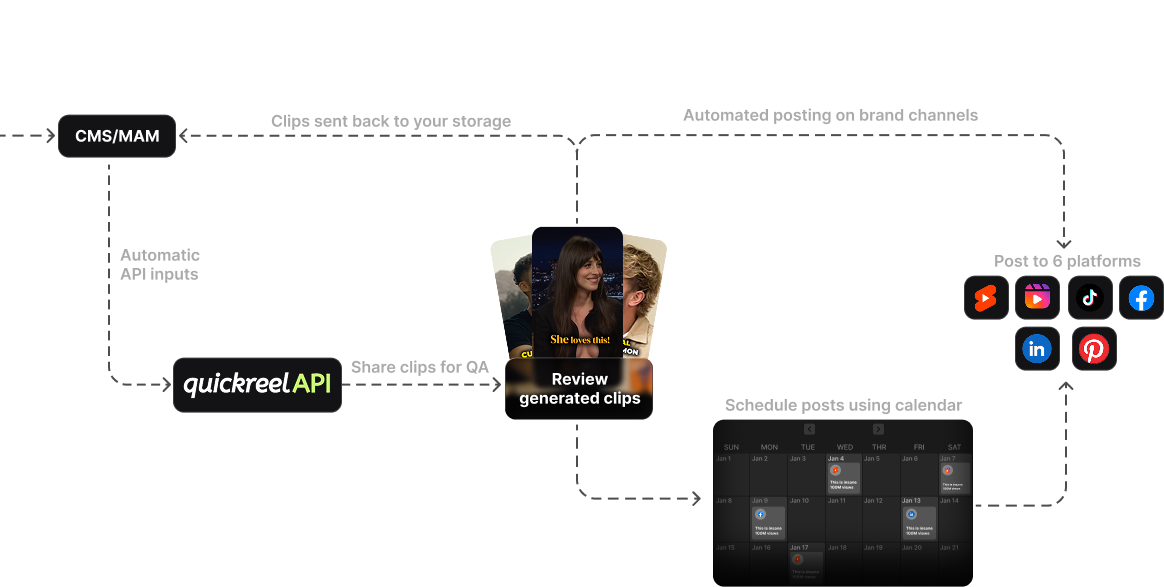
- A scheduler. Posting 20–30 clips a week by hand is the real cost of "no scheduler." QuickReel schedules to 6 platforms on Pro and up to 30 on Ultimate (pricing); Opus Clip adds its scheduler at the $29 Pro tier (fluxnote).
- Priority rendering and higher caps. Free jobs wait; paid jobs run sooner, and the minutes cap lifts enough to clip a back catalog.
- Brand and language reach. Brand templates keep clips consistent; QuickReel supports 20+ languages, which a free tier rarely opens up.
One honest caveat that applies to every tool on this page, free or paid: AI clipping still needs roughly 20–40% human review. The tool finds the moment and lays the captions; you trim the dead air, fix a misheard word, and check the crop. Paid removes the friction. It does not remove the editor, you.
Free vs paid, side by side
| Free tiers (typical) | Entry paid ($9–$19) | Pro paid ($17–$29) | |
|---|---|---|---|
| Watermark | Yes, on every export | Removed | Removed |
| Aspect ratios | Often 9:16 only | All | All |
| Monthly volume | ~60 min / 1–3 clips | One+ episode | Several episodes |
| File expiry | As short as 3 days | Standard storage | Extended storage |
| Scheduler | No | Limited (1–6 platforms) | Yes (up to 30) |
| Best for | Testing, one-offs | Solo, consistent posting | Teams, multi-platform |
Pricing and free-tier terms across these tools change often, and our research turned up genuine disagreement between sources on the exact specifics, whether Vizard's free upload limit is counted in minutes or in videos per month, whether Klap's free offer is one video or three. Always check the live pricing page before you commit. The shape of the tradeoff, though, is stable: free taxes you in friction, paid taxes you in dollars, and past a few episodes a month the dollars are cheaper.
How we compared these
I pulled current free-tier and paid pricing directly from each tool's 2026 pricing pages and from independent reviews (Opus Clip, QuickReel, Vizard, makeshorts), then translated each restriction into the workflow cost it imposes, the part pricing pages never show. The cost-per-clip figures are estimates: monthly price divided by the clips a tier realistically yields for a regular podcast, not lab numbers. For a deeper buyer's view, see our guides on the best clip tool setup for solo podcasters and choosing a podcast clip tool for an agency. To run the math on your own volume, use our true cost-per-clip method, and for the pure quality question, are free clip tools good enough to ship. If you've outgrown a free tier and want a like-for-like swap, compare the best Opus Clip alternatives and the wider field of AI podcast clip generators.
FAQ
Are paid clip tools worth it for a small podcast? If you post clips weekly, yes, usually from the cheapest paid tier. The $9–$17/mo entry plans remove the watermark, open all aspect ratios, and lift the cap, which lowers your real cost per finished clip below what a watermarked, capped free tier costs you in time and re-exports.
Is free podcast clip software good enough to publish? The clip detection on free tiers is usually close to paid, on most tools both run the same core model, so you get broadly the same suggested moments (some ranking extras, like Opus Clip's virality score, are paid-only). What's not publish-ready is the output: a watermark and a 9:16-only lock mean you either re-export to fix them or post a clip that advertises the tool. Fine for testing, weak for a brand.
What is the catch with free clip tools? The catch is rarely quality, it's watermarks, low export caps, file expiry (as short as three days on Opus Clip's free plan), aspect-ratio locks, lower render priority, and no scheduler. Each is a cost you pay in time or reach instead of dollars.
How many clips can I make on a free plan? It varies, but it's tight. Opus Clip's free tier gives 60 processing minutes a month, roughly one hour-long episode, with watermarked exports that expire in three days (eesel). Vizard's free tier runs on monthly upload credits and caps exports, with every clip watermarked and limited to 720p (Vizard pricing). Verify current limits on each pricing page.
Does QuickReel have a free option? QuickReel lets you sign up and try the editor without a card, and paid plans start at $9/mo (100 credits ≈ one episode), with Pro at $17.40/mo adding scheduling to 6 platforms. Check the current terms on quickreel.io/pricing.