
Red Flags to Watch When Buying a Clip Tool


The dealbreakers in a clip tool are almost never on the homepage. They are the metered minute cap that throttles your back catalogue, the watermark that survives onto your paid clips, the caption editor that does not actually let you fix a wrong word, the support channel that is a bot with a 72-hour reply, and the export format that locks your work inside the app. This is the anti-checklist: nine red flags, and for each one, the exact thing to do in a free trial to catch it before your card is on file.
Run one episode through three of these tools and you get back largely the same shortlist of moments, they all chase the same laughs, hot takes, and clean soundbites (QuickReel's own side-by-side trial notes). So the question is never "which finds better clips." It is "which one is hiding a cost or a constraint that will surface in week three." A red flag is not a missing feature, it is a feature that looks fine on the pricing page and turns out to be gated, capped, or fake once you depend on it.
What counts as a red flag versus a fair trade-off
A red flag is a constraint the vendor could have made obvious and chose to bury, a cap stated in credits but not minutes, a watermark removed only on a tier two steps above the one advertised, a cancellation that quietly renews annually. A fair trade-off is a stated limit you can see and price in: a free tier capped at 720p is fine if the page says 720p. The test is disclosure. If you have to run a trial to discover it, it is a red flag, and the rest of this guide is how to run that trial on purpose.
The stakes are higher for clipping than for most software you buy. The single biggest predictor of whether a show survives is publishing consistency, and about 47% of podcasts stop at three episodes or fewer (Amplifi Media analysis). A tool that adds friction or a surprise charge every week is a tool you quietly abandon, and clips drive 20–40% of a video show's new audience (Podcast Studio Glasgow), so abandoning the tool means abandoning the growth channel. Catching the red flag before you commit is cheaper than switching later.

The nine red flags, and how to surface each before you pay
Each red flag below comes with a one-line trial test. Run them on a real episode in the free tier, not the vendor's demo clip. The whole sweep takes one evening across two or three shortlisted tools.
1. The hidden minute or credit cap
The flag: the price looks low, but the plan meters in a unit that does not match how you work. A "100 credits" plan tells you nothing until you know what one credit buys, a minute, an upload, a finished clip. Per-minute and per-upload plans behave completely differently. Klap, for example, meters by uploads, not minutes, its Basic plan is 10 videos a month regardless of length, and its headline $14/mo is the annual-billed rate, not a monthly one (Klap pricing). That is generous for a weekly show and brutal for anyone processing a back catalogue. Per-minute and per-credit tools (Opus Clip, Vizard) flip it: a long episode drains a small plan fast.
Surface it: before paying, do the arithmetic on one real month. Take your episode count times your average length, convert to the vendor's unit, and check it against the plan allowance. If the page does not state the conversion plainly, that opacity is itself the red flag.
2. The watermark trap
The flag: "watermark-free" is advertised, but only on a tier two steps above the one you were quoted. A watermark signals "reposted" to viewers and to the algorithm, and it costs reach. Opus Clip's free tier carries a watermark, and removing it requires a paid plan (Opus Clip pricing); Vizard's free exports are watermarked and capped at 720p (Vizard pricing). Neither is hidden, both pages state it, which is exactly why they are fair trade-offs and not red flags. The red flag is the tool that implies clean exports at the entry price and then reveals the watermark only after you export.
Surface it: export one clip on the exact tier you intend to buy and inspect the corner frames and the final second. If the watermark only lifts a tier higher, you now know the real price.
3. The caption editor that cannot edit
The flag: it generates captions but barely lets you fix them. Captions are not optional, about 75% of mobile video is watched on mute (Verizon Media / Sharethrough, 2017), and an oft-cited 85% of Facebook video was watched without sound back in 2016 (Digiday; publisher-reported, not Facebook data, so treat it as directional). Every viewer reads the captions on every clip, so a wrong word or a misspelled guest name is a visible defect. The trap is a tool that writes captions you cannot meaningfully correct: no inline edit, no glossary for names, no way to restyle, fixes that do not propagate across the clip.
Surface it: take a clip with a proper noun or jargon term the AI will likely miss, then count the clicks to fix it and confirm the fix carries everywhere it appears. If correcting one word is a chore, multiply that by every clip you will ever ship.
4. Lock-in exports and no clean way out
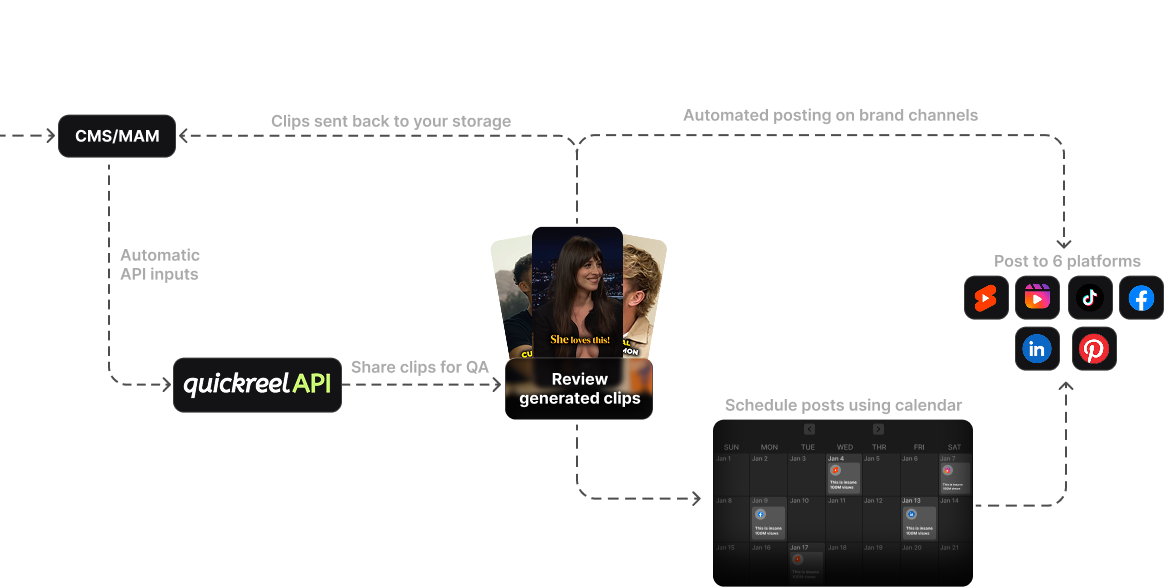
The flag: your work lives inside the app and cannot leave it whole. You can export a rendered MP4, but not the captions as an SRT, not the project, not anything you could carry to another tool or a human editor. That is fine until the day you outgrow the tool or want a freelancer to finish a clip, and then you are re-doing work the software already did.
Surface it: before paying, find the export menu and confirm you can pull a clean MP4 at full resolution and a separate caption file (SRT or VTT). If captions only exist burned into the video, you are locked into that tool's caption styling forever.
5. Vague metering you cannot predict
The flag: you genuinely cannot tell what a month will cost. The unit is "credits," the conversion is buried in a help-doc, and re-rendering a clip after an edit may or may not cost another credit. Unpredictable metering is how a $9 plan becomes a $40 month. The honest tools state the unit on the pricing page and tell you whether edits and re-renders are free.
Surface it: ask one direct question of support or the docs, "does re-rendering an edited clip cost another credit?" The answer, and how fast it comes, tells you about both the metering and red flag #7.
6. No manual reframe override
The flag: auto-reframe is the whole product, and when it gets the crop wrong, you cannot fix it. Auto-reframe is genuinely useful, but it misses, a guest leans out of frame, a two-shot crops to the wrong speaker, a gesture gets cut off. A tool with no manual override turns every miss into a discard. This is the line where a clip tool and a real editor diverge, and where many buyers feel the gap only after a month of unusable auto-crops.
Surface it: clip a two-person segment where the speakers trade quickly, then look for a manual reframe or keyframe control. If the only fix for a bad crop is "re-run it and hope," budget for the clips you will throw away.
7. Support that is a slow bot
The flag: when something breaks mid-launch, there is no human. Support is weighted lightly in a normal buying decision and weighted heavily the one week your render queue stalls before a launch. The red flag is a vendor that hides response times, routes everything through a chatbot, and has no documented channel for a real problem.
Surface it: send one real question during the trial, about metering, or a stuck export, and time the reply. A vendor's trial-stage support is the best version you will ever get; it only gets slower after you pay.
8. Forced annual billing and murky cancellation
The flag: the attractive price is annual-only, or the monthly plan auto-renews into an annual term, or cancellation routes through a retention maze. There is nothing wrong with an annual discount that is clearly offered. The red flag is an annual lock presented as if it were monthly, or a cancellation you cannot complete yourself.
Surface it: read the billing and cancellation terms before you enter a card, and confirm you can cancel from the account settings in your own clicks, not by emailing to "request" it. If the path out is unclear, the path in is a trap.
9. A stalled or unfunded vendor
The flag: you are building a weekly workflow on a tool that may not exist next year. This one is harder to see in a trial, but funding and usage are public for some vendors. Opus Clip, for instance, reached a $215M valuation in March 2025 with 10M+ users and 170M+ clips generated (Sacra), a signal it will still be shipping next year. The flag is a tool with no recent changelog, dead social accounts, and no sign of active development.
Surface it: check the changelog or release notes and the company's last few public updates. A tool that has not shipped in a year is a tool you will be migrating off of, and migration is its own cost.
How to run a trial that exposes red flags instead of hiding them
A normal trial hides red flags because you test on your best episode and you stop at the first clip that looks good. A trial built to expose them does the opposite: it pushes on the lines the vendor would rather you not check.
Use a real episode with the audio quirks and accents your show actually has, push it through the tier you would genuinely buy, and deliberately do the five things a happy demo never does, the watermark check, the caption fix, the minute math, one support question, and a clean export. If you can, walk all the way to the cancellation screen before you decide, so you know the exit exists. One evening of this beats a month of regret.
When two tools survive the sweep, break the tie on the constraint your show feels every week. A localized show breaks ties on the caption editor. A team breaks them on seats and support. A solo creator breaks them on touch count and price, the version covered in the best clip tool setup for solo podcasters.

Live pricing context for the metering and watermark flags
Red flags #1, #2, and #5 turn on price and packaging, which move constantly. Here is where four common tools sat on 27 June 2026, re-check each vendor's page before you buy, because SaaS pricing changes month to month.
| Tool | Entry paid price | Metering & a red-flag note |
|---|---|---|
| QuickReel | $9/mo Starter | Per-credit; scheduler on every plan, watermark-free and full caption editing on paid tiers |
| Opus Clip | $15/mo Starter | Per-minute; free tier watermarked and 9:16 only; watermark-free export gated to Pro ($29/mo) |
| Vizard | Free tier + paid | Per-credit; free exports are 720p with a watermark, stated plainly, so a fair trade-off |
| Klap | $14/mo Basic (billed yearly) | Per-upload, not per-minute, 10 videos/month on Basic regardless of length; the headline $14 is the annual-billed rate, so red flag #8 applies |
Sources: QuickReel pricing, Opus Clip pricing, Vizard pricing, Klap pricing; all verified 27 Jun 2026.
The Klap row is the one to read twice for red flag #1. Per-upload metering is not worse than per-minute, it is just different, and it rewards a different show. Ten long episodes a month is a bargain on uploads and a fortune on minutes; ten short clips of a long stream is the reverse. The flag is never the metering unit itself. It is a metering unit you did not understand before you paid.
Where QuickReel sits on this list, honestly
QuickReel clears most of these flags, and it is fair to say where it does not. On the green side: paid tiers are watermark-free, captions are fully editable across 20+ languages with reusable brand templates, the scheduler is on every plan so clips post without an export-and-re-upload loop, and the entry price is $9/mo, the lowest paid entry among the four above (QuickReel pricing). It exports clean files, so red flag #4 does not apply.
Where it does not max the list: it is not a deep timeline editor, so if frame-accurate manual reframing (red flag #6) is central to your work, a dedicated editor still beats it. And like every AI clipper, its output still needs a human review pass, checking the chosen moment, the crop, and the caption spelling, before a clip is fit to post. No tool on the market removes that step, and any vendor claiming it does is waving a tenth red flag. Run QuickReel through the same trial sweep as everyone else and judge it on your episode, not this paragraph.
FAQ
What are the biggest red flags when buying a clip tool? The two that surprise buyers most are a hidden metering cap (a "credits" or "minutes" allowance that does not match how you publish) and a watermark trap (clean exports advertised at the entry price but actually gated a tier or two higher). Both surface only after you export, so test them in the free trial first.
How do I check a clip tool for hidden costs before paying? Do the math on one real month: episodes times average length, converted to the vendor's metering unit, against the plan allowance. Then export one clip on the tier you would buy to confirm the watermark and resolution, and ask support whether re-rendering an edited clip costs another credit. Unclear answers on the pricing page are the warning sign.
Is a watermark on a free clip tool always a red flag? No. A watermark on a clearly labelled free tier is a fair trade-off, Opus Clip and Vizard both state it on their pricing pages (Opus Clip, Vizard, verified 27 Jun 2026). It becomes a red flag only when clean exports are implied at a paid price and the watermark turns up after you export. The test is disclosure.
Does any clip tool fully replace a human editor? No, and any vendor claiming it does is the loudest red flag of all. Every modern AI clipper still needs a human pass, confirming the moment, fixing the crop, correcting caption spelling, before a clip is fit to post. Treat these tools as accelerants, not replacements, and buy the one that makes the unavoidable review fastest.
How long should I trial a clip tool before buying? One evening across two or three shortlisted tools. Run the same real episode through each free tier and deliberately test the constraints a happy demo skips, watermark, caption fix, minute math, one support question, a clean export. If you can, walk to the cancellation screen before deciding. The slow part is honesty on the lines marketing glosses over.
Buy on the trial, not the homepage
Buy on the trial, not the homepage. The nine flags above all share one property: they are invisible until you depend on the tool, by which point your card is on file and your workflow is half-built on it. The fix is cheap, an evening of testing the constraints a vendor would rather you skip, on a real episode, at the tier you would actually pay for.
For buyer profiles where the weights shift, the red flags rank differently: see choosing a podcast clip tool for an agency and what teams should compare in multi-seat clip tools for the seat-and-support flags that bite teams hardest, picking a clip tool for an in-house brand team for brand-template lock-in, and the best clip tool setup for solo podcasters for the time-first version. To seed a shortlist worth running through this sweep, start with the best AI podcast clip generators and the best Opus Clip alternatives.