
A 25-Point Podcast Clip Tool Buying Checklist


Before you pay for a podcast clip tool, score it against 25 specific criteria across five categories, export quality, caption accuracy, aspect ratios, integrations, and support, and pick the vendor with the highest weighted total, not the slickest demo. Reviewers who benchmark these tools on identical footage keep landing on the same finding: on talk-heavy episodes the top clips overlap heavily, so for most creators the difference in clip quality is marginal and "the bigger differentiator is cost" and workflow (Ssemble multi-tool test). The differences that decide the call are the ones below, not the marketing. Copy the checklist into a spreadsheet, rate each tool 0–2 per line, weight by category, and let the number decide.
This is a buying rubric, not a roundup. It does not crown a winner for you, because the right tool for a daily news show with five seats is the wrong tool for a solo creator who clips on Sunday nights. What it does is force every vendor through the same gate, so you stop comparing one tool's homepage to another tool's free trial and start comparing like to like.
Why a scored checklist beats a free-trial spree
A scored checklist beats running five free trials because trials reward whatever tool you happen to test first and on your best episode. A rubric tests every vendor on the same criteria, surfaces the dealbreakers a demo hides, and gives you a defensible number to show a teammate or a manager. It turns "this one felt nicer" into "this one scored 82, that one scored 67, here is the line where they split", the exact split in the worked example below.
The stakes are higher for clipping than for most software. The single biggest predictor of whether a show survives is publishing consistency, and nearly half of all podcasts never make it past their first three episodes Amplifi Media. A clip tool that adds friction every week is a tool you will quietly stop using, and then you stop clipping, and then the discovery engine that drives 20–40% of a video show's new audience (Podcast Studio Glasgow) goes quiet too. The checklist is really a test of whether you will still be using the tool in three months.
One caveat to set up front, because every honest comparison needs it: no AI clipper removes the human pass. The reviewer consensus is that AI gets you roughly 80–90% of the way there and a quick human pass, checking caption accuracy, cut points, and context, does the rest before a clip is fit to post (choppity, 11 tools tested). So none of the 25 points is "does it edit for me." They are all "does it make the unavoidable work faster, cleaner, and cheaper."
The five categories and how to weight them
The 25 points split into five categories of five. The default weights below add to 100 and reflect what usually decides the outcome for a small-to-mid show. Adjust them to your constraints before you score, a localized show should push caption accuracy up; an agency should push integrations and support up.
Score each of the 25 lines 0, 1, or 2, 0 for absent or broken, 1 for present but limited, 2 for genuinely good. Each category maxes at 10 raw points; scale that to the category weight (raw ÷ 10 × weight) and sum. A perfect tool scores 100. In practice the leaders land in the 70s and 80s, and the gap between them is exactly the line where your decision lives.
The 25-point checklist
Copy these into a spreadsheet, one row per line, one column per tool. The bracketed note after each line tells you what a "2" looks like so you score consistently.
Category 1, Export quality (weight 25)
The clip a viewer sees is the only output that matters. This is half the reason to switch tools.
- Resolution on your real plan, does the plan you would actually buy export 1080p, or is full resolution gated to a higher tier? (2 = 1080p on your tier; some free tiers cap at 720p, like Vizard's, per Vizard pricing.)
- No forced watermark on a paid plan, a watermark signals "reposted" and costs reach. (2 = watermark-free on a tier you can afford. Opus Clip's free tier carries a watermark; the $15/mo Starter plan removes it, per Opus Clip pricing.)
- Frame rate and motion handling, do fast cuts and gestures stay smooth, or does the export judder? (2 = clean motion at 30fps+.)
- Audio fidelity in the export, is the audio clean and level-matched, or does it clip and hiss? (2 = export audio matches the source.)
- Render speed on a normal episode, can you ship same-day, or does a 45-minute episode sit in a queue? (2 = minutes, not hours, on your tier.)
Category 2, Caption accuracy (weight 25)
Captions are not optional. Most social video is watched on mute, Verizon Media/Sharethrough reported roughly 75%, and Digiday reported up to 85% of Facebook video played without sound (publisher-reported, directional). Bad captions are visible to every viewer, every time.
- Transcription accuracy on your audio, test on a real episode with your accents and jargon, not the vendor's demo. (2 = under one error per 100 words.)
- Speaker and proper-noun handling, does it spell guest names and brand terms correctly? (2 = names land right or are easy to lock in a glossary.)
- Edit speed for fixes, when a word is wrong, how many clicks to fix it across the clip? (2 = inline edit, propagates everywhere.)
- Caption styling and brand templates, can you save a font, color, and placement once and reuse it? (2 = reusable brand templates; QuickReel ships 12+ caption styles and brand templates, per QuickReel pricing.)
- Languages and translation, does it cover the languages you publish in and translate cleanly? (2 = covers all your languages. QuickReel lists 20+ languages; Klap advertises AI dubbing to 29 languages on paid tiers, per Klap pricing.)
Category 3, Aspect ratios and reframing (weight 20)
A clip lives or dies on whether the speaker is framed and the captions are inside the safe zone.
- All three ratios, does it export 9:16, 1:1, and 16:9 from one source? (2 = all three, no re-render headache.)
- Auto-reframe quality, does it keep the active speaker centered, or cut off faces? (2 = faces stay in frame across speaker changes.)
- Multi-speaker tracking, for interviews and panels, does it follow whoever is talking? (2 = clean speaker switching, no jarring jumps.)
- Manual reframe override, when auto gets it wrong, can you nudge the crop by hand? (2 = a one-touch manual override exists.)
- Safe-zone awareness, does it keep captions and faces clear of platform UI overlays? (2 = layout respects each platform's safe zones.)
Category 4, Integrations and workflow (weight 20)
This is where your weekly hours actually go, the touches between a URL and a posted clip.
- Direct import from your source, YouTube URL, Zoom, Riverside, Drive, or a file upload that fits your size. (2 = imports from where your recording already lives.)
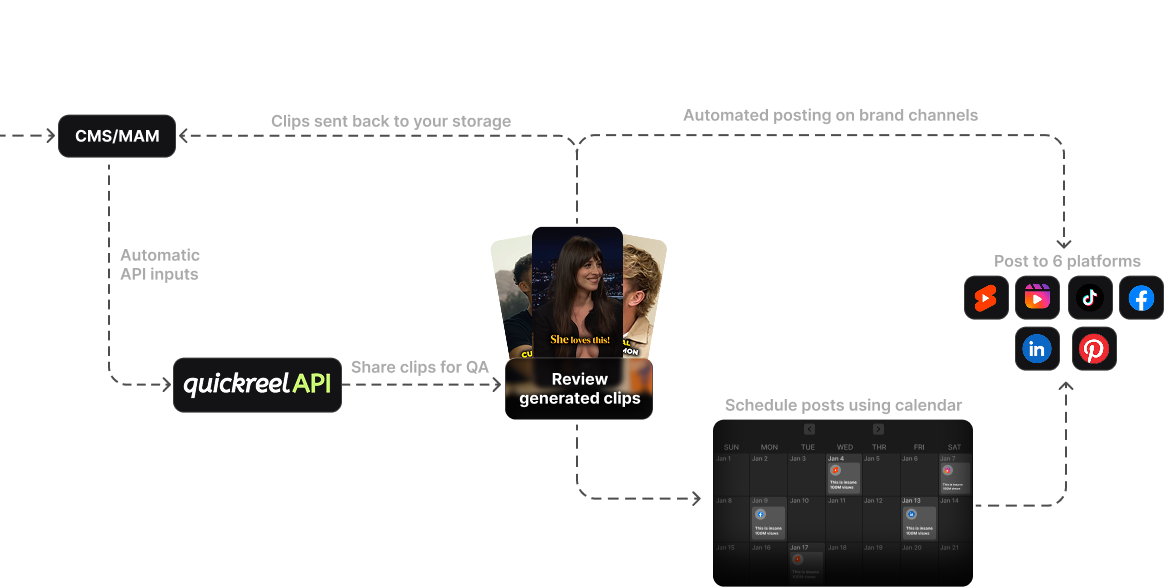
- Built-in scheduling and posting, can you publish to platforms inside the tool, or must you export and re-upload? (2 = schedule and post in-app. QuickReel includes a scheduler on every plan, up to 30 platforms on Ultimate, per QuickReel pricing.)
- Bulk processing, does it clip a full back catalogue without you babysitting each one? (2 = batch import and batch export.)
- Team seats and roles, for more than one person, are there real seats with sensible permissions? (2 = seats with role control; QuickReel's seats scale from 2 on Pro+ to 10 on Ultimate, per QuickReel pricing.)
- API or programmatic access, only if you need it; do not pay for an API you will not call. (2 = an API exists and is documented, if your workflow needs it.)
Category 5, Support and onboarding (weight 10)
Weighted lightest, but a dealbreaker when something breaks mid-launch.
- Responsive human support, is there a real channel with a sane response time, not just a bot? (2 = documented response time you can live with.)
- Documentation and tutorials, can a new teammate self-serve the basics? (2 = current, searchable docs.)
- Refund and cancellation terms, can you leave cleanly, or are you locked into an annual term? (2 = clear, fair cancellation.)
- Billing transparency, is the metering unit (minutes vs uploads) obvious, and does it match how you work? (2 = metering you understand and can predict.)
- Roadmap and stability, is the vendor shipping and funded, or stalled? (2 = active development, signs of staying power.)
That last line is more concrete than it sounds. Funding and usage are public for some vendors, Opus Clip, for instance, reached a $215M valuation in March 2025 with 10M+ users and 170M+ clips generated (Sacra). That is a signal the tool will still exist next year, which matters when you are building a weekly workflow on top of it.

How to run the checklist in one evening
You do not need a week of trials. Shortlist three tools, run one real episode through each free tier, and score as you go.
Use the same episode for every tool. That is the rule most buyers break, they test tool A on a clean studio episode and tool B on a noisy remote one, then conclude A has better captions. It does not; it had better audio. Hold the input constant and the scores mean something.
When two tools tie within a few points, break it on the category your show actually feels every week. A localized show breaks ties on caption accuracy. A team breaks them on seats and scheduling. A solo creator breaks them on touch count and price, which is the subject of the best clip tool setup for solo podcasters.
A worked example: two tools, same rubric
Here is the rubric applied to two anonymized tools so the math is concrete. Tool A is a polished clip-finder with a virality score but a gated editor and a watermarked free tier. Tool B is a consolidated clip-plus-caption-plus-schedule tool at a lower entry price. Both detect moments well; they split on the lines that follow.
Read the chart and the decision is not close, but notice why. Tool A scored well on aspect ratios, its reframing is genuinely strong. It lost on export (the watermark and a 720p free tier dragged it down) and on integrations (no in-app scheduling, so every clip needs a manual re-upload). Those are the avoidable touches that pile up week after week. The rubric caught a real difference a side-by-side feature grid would have flattened into "both export clips, both add captions."

Live pricing context for the integrations and billing lines
Lines 17, 19, and 24 turn on price and packaging, which move constantly. Here is where four common tools sat on 27 June 2026, re-check each vendor's page before you buy, because SaaS pricing changes month to month.
| Tool | Entry paid price | Metering & a checklist note |
|---|---|---|
| QuickReel | $9/mo Starter (100 credits) | Per-credit; scheduler on every plan, seats from 2 (Pro+) to 10 (Ultimate, 30 platforms) |
| Opus Clip | $15/mo Starter | Per-minute; Starter removes the watermark, full editor + all aspect ratios gated to Pro ($29/mo); free tier watermarked, 9:16 only |
| Vizard | Free tier (60 credits) + paid | Per-credit; full editor on free tier, but free exports are 720p with a watermark |
| Klap | $14/mo Basic, billed yearly (10 uploads) | Per-upload (not minutes); AI dubbing to 29 languages on Pro and Pro+ |
Sources: QuickReel pricing, Opus Clip pricing, Vizard pricing, Klap pricing; all verified 27 Jun 2026.
The Klap row is the one to read twice for line 24. It meters by uploads, not minutes, 10 videos a month on Basic, regardless of length (Klap pricing). For a weekly show that is plenty; for anyone clipping a back catalogue it caps faster than the headline price suggests. QuickReel, Opus, and Vizard meter by credits or minutes, so a long episode burns a budget fast on the smallest plans. Score the metering against how you actually work, not against which number looks smallest.
Where QuickReel tends to score, honestly
On this rubric, QuickReel earns its points on the integrations and export categories: a YouTube-URL import, captions in 20+ languages with reusable brand templates, and a scheduler built into every plan so clips post without an export-and-re-upload loop (QuickReel pricing). It enters at $9/mo, the lowest paid entry point among the four above, which helps lines 23 and 24.
Where it does not max the rubric: it is not a deep timeline editor, so if line 14's manual reframe and frame-accurate cutting are central to your work, a dedicated editor still beats it. And its clips, like every tool's, need the human review pass before they go out, no entry on this checklist is "it edits for you," and QuickReel does not pretend otherwise. Score it the same way you score everyone: on your own episode, against your own weights.
FAQ
What should I check before buying a podcast clip tool? Check 25 things across five categories: export quality (resolution, watermark, render speed), caption accuracy (transcription, fixes, languages), aspect ratios (9:16/1:1/16:9 and auto-reframe), integrations (import source, in-app scheduling, seats), and support (response time, refunds, billing clarity). Score each 0–2, weight by category, and compare totals.
How do I compare clip tools objectively instead of by gut feel? Run the identical episode through each tool's free tier and score it against the same rubric, line by line. Holding the input constant is the rule most buyers break, testing different tools on different episodes measures your audio, not the tools. Same input plus same rubric gives you a defensible number.
Which checklist category matters most? For most shows, caption accuracy and export quality, because they are the lines every viewer sees on every clip, most social video plays on mute (~75–85%, publisher-reported) so captions carry the message. Localized shows should weight caption accuracy higher; teams should weight integrations and support higher. Adjust the default weights before you score.
Do free clip tools pass this checklist? Some come close, but free tiers usually cost points on export quality, Vizard's free tier caps at 720p with a watermark, and Opus Clip's free tier is watermarked and 9:16 only (Vizard pricing, Opus Clip pricing, verified 27 Jun 2026). A watermark signals "reposted" and costs reach. Free is fine for your first month of habit-building; score the paid tier you would actually buy.
How long does it take to evaluate clip tools with this checklist? About one evening. Shortlist three tools to your budget, run one real episode through each free tier, score the 25 lines as you go, apply the weights, and compare totals. The slow part is being honest on the lines a demo glosses over, render speed on your tier, watermark on a plan you can afford, and how many clicks a caption fix really takes.

Score, do not browse
Twenty-five lines, five categories, the same episode through every tool, weighted to your show's real constraints, that is how you turn a crowded market, where detection quality has largely converged for talk-heavy shows, into a single number you can stand behind. The leaders cluster in the 70s and 80s. The gap between them is the category your show feels every week, and the rubric makes that gap impossible to miss.
For buyer profiles beyond the generic case, the math shifts: see choosing a podcast clip tool for an agency and what teams should compare in multi-seat clip tools for seat-and-review weighting, picking a clip tool for an in-house brand team for brand-template weighting, and the best clip tool setup for solo podcasters for the one-person, time-first version. If you want a tested ranking to seed your shortlist, start with the best AI podcast clip generators and the best Opus Clip alternatives, then run the survivors through this checklist.