
When You Need a Clip Tool With an API

You need a clip tool with an API once the same long video has to become clips again and again without a person opening a dashboard. If you upload one episode a week and pick clips by hand, an API buys you nothing. If a CMS publishes 40 videos a day, or every recording should auto-generate shorts the moment it lands, the API is the only sane way to wire it. The decision is about repetition, not company size.
Most buyers searching "clip tool with API" actually want one of three things: a content team feeding a publishing pipeline, an agency clipping client uploads at volume, or a developer building clipping into their own product. The job below is to tell you which of those genuinely needs an API, what three endpoints to demand, and the rate-limit and billing details that quietly break automation at scale. Every price and limit here was checked against the vendors' own docs on 27 June 2026; verify before you commit, because these move.
When does a clip tool actually need an API?
A clip API earns its keep when clipping is a repeated, hands-off step inside a larger system, not a thing a person chooses to do. The trigger: you process the same kind of long video on a schedule, the output feeds another system automatically, and nobody should have to log in. Below that bar, a dashboard with bulk upload is faster and cheaper.
Here is the decision rule I give teams. An API is justified when two or more of these are true:
- Volume is steady and high. You clip dozens of videos a week, every week, and the count is going up. A one-off back-catalog import does not count; bulk upload in a dashboard handles that once.
- The trigger is an event, not a person. A recording finishes, a webinar ends, an RSS item drops, and clips should start without anyone deciding to start them.
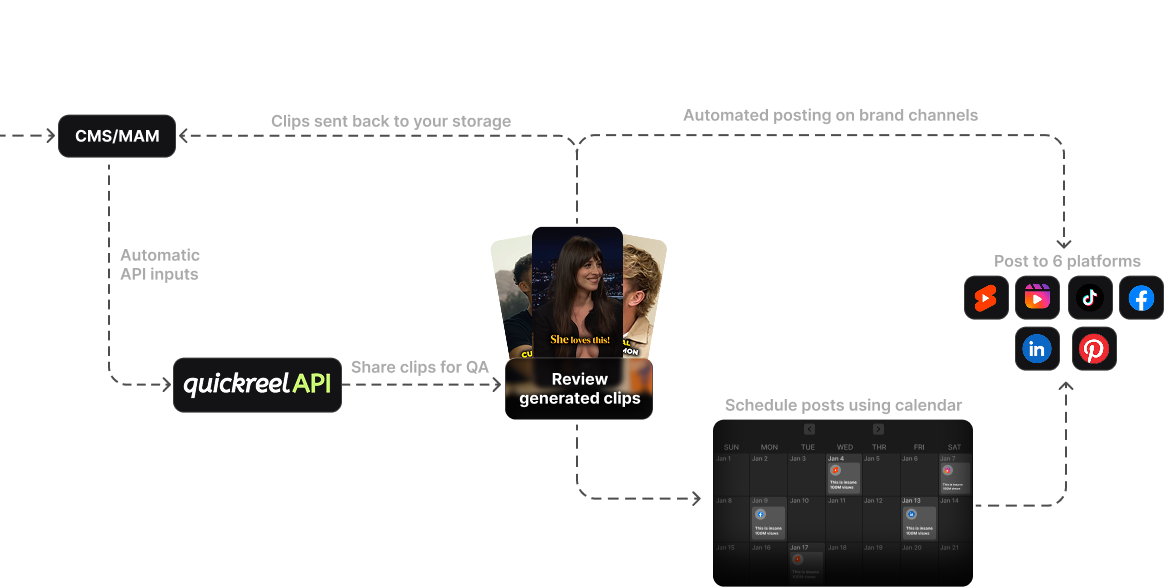
- The output has somewhere to go on its own. Clips need to land in your CMS, your app feed, your DAM, or a scheduler automatically. If a human reviews and posts each clip anyway, the API saved you one upload click and nothing else.
- You are building a product. You are putting clipping behind your own UI for your own users. This is the one case where you have no choice, you need the API.
If you check one box or none, stay on the dashboard. The most common mistake I see is buying an enterprise API tier to clip eight videos a week, then paying for concurrency and seats no one uses.

What endpoints should a clip API have?
A clip API needs three things to be worth wiring in: a way to submit a video and clipping preferences, a way to learn when the job is done, ideally a webhook, not just polling, and a way to retrieve the finished clip files and their metadata. Anything less and you are gluing a dashboard to a cron job. Treat these as the minimum spec before you compare prices.
1. Submit (ingest). You POST a long-form video, usually a public URL, sometimes a direct file upload, plus preferences: aspect ratio, language, brand template, clip length. OpusClip's documented entry point, for example, is a single POST https://api.opus.pro/api/clip-projects that takes a videoUrl and options like curationPref and brandTemplateId (OpusClip API docs). Vizard's equivalent is a /project/create call (Vizard quickstart). Demand URL submission at minimum; file upload is a bonus.
2. Status and webhooks. Clipping is slow, a 30-minute talking-head video takes Vizard about 10 minutes to process by its own estimate (Vizard quickstart). You cannot block on that. So you need either a status endpoint you poll or, far better, a webhook that POSTs to your server when clips are ready. Vizard supports both and tells you to poll at 30-second intervals if you go that route (Vizard quickstart). OpusClip documents webhooks for real-time notifications alongside a query endpoint for fetching clip details (OpusClip API reference). Prefer the webhook: at three requests a minute on Vizard, a polling loop spends your whole rate-limit budget asking "is it done yet" instead of submitting new work. If a tool offers no webhook, you can still automate, you just pay for it in polling requests.
3. Retrieve. Once a job finishes, you pull the clip files and their metadata: URLs, durations, captions, and any virality or confidence score the tool assigns. Check how long the vendor keeps your outputs. OpusClip projects expire in 30 days by default unless auto-save is on (OpusClip API reference); Vizard's API returns a clip download URL that stays valid for 7 days (Vizard: retrieve video clips). If you do not pull clips into your own storage inside that window, they vanish.
Which clip tools actually have an API?
Several do, but they gate it differently, some include it on mid-tier plans, others lock it behind enterprise contracts. The table below covers the tools with a documented, public clip API as of June 2026, with the access tier, how it bills, and the published rate limit. Prices and limits change; treat this as a starting point and confirm on each vendor's docs.
| Tool | API access tier | Billing & rate limit (verified June 2026) |
|---|---|---|
| OpusClip | Pro (Beta)/Max include API (15 hrs of API video/mo); Business per contract | 1 credit = 1 min of source video; 10-credit (~10 min) minimum per project; 30 requests/min per key; 429 over limit (OpusClip) |
| Vizard | Included on paid plans (Creator and up) | 1 credit = 1 min of video; uses your plan minutes; 3 requests/min; webhook + polling (Vizard) |
| Submagic | Business + API plan ($69/mo, 100 API min) | API credit packs from $75/mo for 500 min ($0.15/min, dropping to $0.10/min at 5,000 min) (Submagic pricing) |
| QuickReel | Request access; API offered to developers/media houses | Request-based; pricing by contact, not self-serve (QuickReel API) |
Two things to read out of that table. First, almost every API bills on source video length, not clip count. OpusClip and Vizard both charge per minute of the video you submit, regardless of how many clips come back (OpusClip; Vizard). A 60-minute episode costs the same whether you keep 3 clips or 30. That favors long-source workflows and punishes submitting the same video twice. Second, the rate limits differ by an order of magnitude. OpusClip allows 30 requests per minute; Vizard allows 3 (OpusClip; Vizard). At three requests a minute, a 200-video back-catalog import needs careful queueing or it stalls on 429s.

The four gotchas that bite at volume
The features are easy to compare. The constraints are where automation projects fail. Watch these four.
Tier-gating that moves. OpusClip's API has shifted between closed beta, large-volume annual plans, and general availability over the past year, with full access tied to its Business tier (OpusClip API reference). Vizard, by contrast, includes the REST API on its paid Creator plan upward (Vizard help center). If the API lives only on a custom enterprise contract, your "API plan" is a sales call, not a sign-up.
Per-minute billing on resubmits. Because billing tracks source length, every reprocess of the same episode bills again. Build idempotency in: store the job ID and clip URLs the first time so a retry does not re-clip, and re-bill, the whole video.
Storage expiry. Clip outputs are not yours until you copy them. Vizard's API download URLs expire after 7 days (Vizard: retrieve video clips) and OpusClip projects expire in 30 days (OpusClip API reference), so a webhook handler that goes down over a long weekend can lose clips you already paid to generate. Pull to your own bucket on every completion.
The review step does not disappear. An API automates ingestion and rendering, not judgment. In our own clip-quality benchmarks at QuickReel, a meaningful share of auto-generated clips still need a human pass before they go out, reframes drift off-speaker, captions mishear names, and the auto-selected "best" moment is sometimes context-free. Plan a review queue downstream of the webhook; do not auto-publish raw API output unless you genuinely do not care what posts.
How to choose: a short decision sequence
Run these in order. Stop at the first honest "yes."
- Do you ship clipping inside your own product? If yes, you need an API, shortlist by SDK quality and webhook reliability, and request access early because gating varies.
- Is clipping event-triggered and high-volume? If a recording finishing should produce clips with no human in the loop, pick by rate limit and webhook support. OpusClip's 30 req/min suits bursty bulk; Vizard's per-minute credit model and included API suit steady mid-volume teams (OpusClip; Vizard).
- Do you just have a big one-time back-catalog? Use bulk upload in a dashboard. Do not build a pipeline for a job that runs once.
- Do you clip a handful of episodes a week by hand? You do not need an API at all. A clean dashboard with brand templates and a built-in scheduler will be faster and cheaper than anything you wire yourself.
For who-buys-what context, the agency clip-tool buyer's guide and the multi-seat team comparison cover seats and client workflows that often sit alongside an API decision; if you are a one-person show, the solo creator setup explains why an API is usually the wrong buy. Still choosing an engine? Start with the tested clip-generator roundup or the Opus Clip alternatives breakdown, and if you run brand content, the in-house brand team guide.

Where QuickReel fits
QuickReel offers a developer API aimed at media houses, agencies, and teams building clipping into their own products, long video in, captioned vertical clips out, with brand templates and 40+ languages (QuickReel API). Access is request-based rather than self-serve, so it is a fit when you have a real volume case, not a single weekly episode.
The honest framing: for most podcasters reading this, the dashboard is the right tool and the API is a future problem. QuickReel's free plan and paid tiers from $9 Starter up to $89 Ultimate exist precisely so you can prove the clip quality on one episode before anyone writes a line of integration code (QuickReel pricing). The API is the same clipping engine with the dashboard removed, so judge the engine first. And like every tool in this category, plan for a human review pass; an API moves the work, it does not delete it.
FAQ
Does a clip tool with an API cost more than the regular plan? Usually yes, and it bills differently. Most clip APIs charge per minute of source video rather than per clip, and access often sits on a higher tier, Submagic's API lives on a ~$69/mo Business + API plan with 100 included minutes (Submagic pricing), while Vizard includes the API on its paid Creator plan using your existing minute allotment (Vizard help center).
Can I automate clipping without an API? Partly. Bulk upload in a dashboard handles high one-time volume, and some tools connect to no-code platforms like Zapier or n8n. But true event-triggered, hands-off clipping, a recording ends, clips appear in your CMS, needs the submit, webhook, and retrieve endpoints only an API provides.
Do I need a developer to use a clip API? For a raw REST API, yes, someone has to handle auth, the submit call, webhook handling, and pulling clips into your storage. Tools with official SDKs (OpusClip publishes SDKs for Node, Python, Go, and others) shorten the work, and no-code connectors can cover simpler cases without writing code (OpusClip API docs).
What is the difference between polling and webhooks for clip jobs? Polling means your code repeatedly asks "is it done yet"; a webhook means the tool tells you the moment it finishes. Webhooks are cheaper at scale: with Vizard capped at three API requests a minute (Vizard rate limit), a polling loop spends your rate budget on status checks instead of new submissions. OpusClip documents webhooks for real-time notifications (OpusClip API reference). Use them if the tool supports them.
How accurate is API-generated clipping, can I auto-publish? Detection is good but not finished work. In our clip-quality benchmarks at QuickReel, a real share of auto-generated clips still need a human fix before publishing: reframes drift off-speaker, captions mishear names, and the auto-selected moment can lack context. Route API output to a review queue rather than auto-posting, unless approval genuinely does not matter for your use case.