
Auto-Schedule a Week of AI Clips From One Episode

One episode is a week of posts. Pull six to eight clips from it, assign each one to a day and a platform, and load the whole queue into a scheduler in a single sitting, so the week posts itself while you do nothing. Space the clips two days apart per platform, put your single strongest clip mid-week, and stagger the same clip across platforms by a day or two rather than blasting it everywhere at once.
The reason to schedule instead of post-as-you-go is not laziness, it's consistency, which is the one variable that reliably moves discovery. Social video clips are now the top driver of podcast discovery, ahead of friend-and-family recommendations for the first time, with 57% of listeners relying on social media for podcast recommendations (InsideRadio, citing new survey data). Showing up daily is what feeds that channel. Posting by hand, daily, is what kills it, you miss days, you burn out, you stop.
If you haven't generated the clips yet, start with batch-clipping a whole episode in one pass; this guide picks up at the pile of clips and turns it into a calendar.
How do you schedule a week of clips from one episode?
Generate 8–12 clips from one episode, keep the 6–8 that score well, then assign each to a day-and-platform slot: one clip per platform every two days, your strongest clip on Tuesday or Wednesday, and the same clip reused across platforms staggered by a day. Load all of them into a scheduler in one session and let it post automatically.
That's the whole move. The rest of this guide is the which clip, which day, which platform, and the spacing logic that makes a one-episode week feel intentional instead of repetitive.
Why an episode covers a week (the repurposing math)
A 20–30 minute episode usually carries far more than seven postable moments, most clippers pull a dozen or more candidate segments before quality, not quantity, becomes the limit. So the constraint is never raw material; it's choosing well and spacing well. You don't need a dozen of them live in seven days. You need the best six to eight, placed so each one gets clear air.
The payoff for placing them well is real. One production studio estimates clips drive 20–40% of new-audience acquisition for video shows and can raise reach 2–5× (Podcast Studio Glasgow; single-studio figures, treat as directional). And you're moving into a crowded lane on purpose: clipping long-form into short, multi-platform uploads is now a fast-growing distribution channel, and plenty of shows reach more people through their clips than through the full episodes. Volume alone won't win that lane; cadence and quality will.
The 6-step setup: from episode to queued week
Each step below is the exact action, in order. Once the rhythm is yours, the whole thing takes 30–45 minutes a week.
1. Generate and shortlist (8–12 → 6–8)
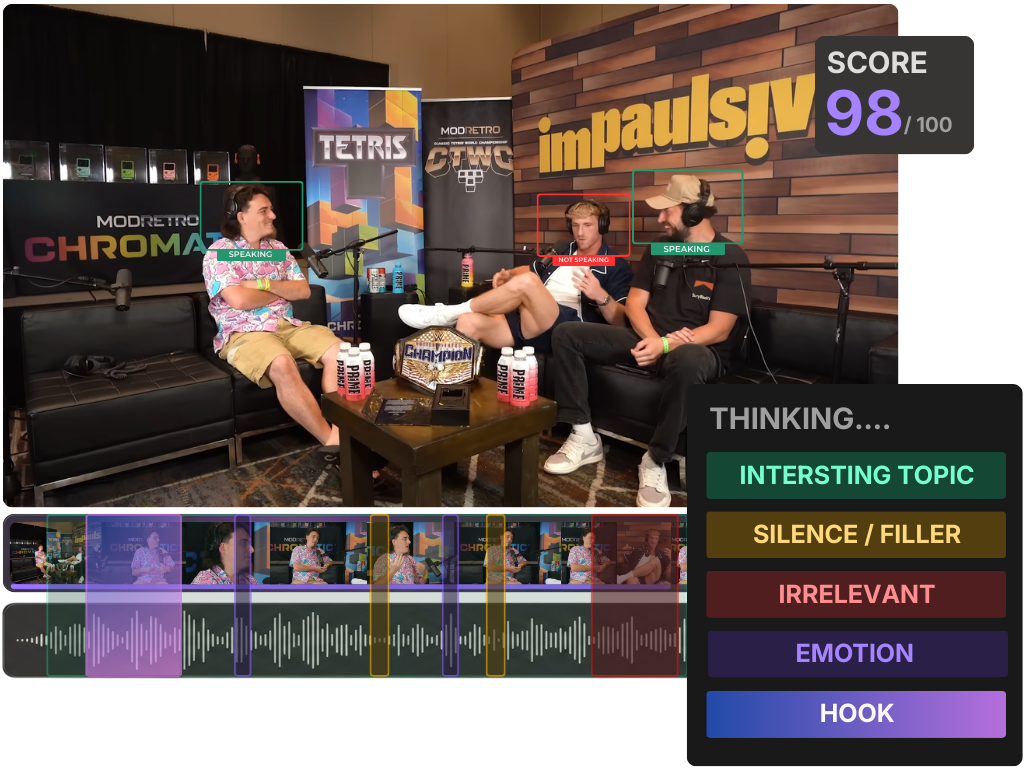
Run the episode through your clipper, then cut the list down. Don't post everything it returns, re-rank against standalone legibility, a two-second hook, one idea per clip, and a clean exit. The 5-criteria rubric for picking the best AI-suggested clips is the fast version of this. Keep the six to eight that clear the bar; the rest sit in reserve for the following week.
2. Name your hero clip
One clip is stronger than the others, the spicy take, the vulnerable admission, the genuinely surprising line. That's your hero. It earns the prime mid-week slot and gets reused across all three platforms (staggered), because your best asset deserves more than one shot. If you're unsure which it is, the AI virality score is a useful tiebreaker, read as "this moment is interesting," not "this will perform."
3. Assign each clip a day and a platform
Use the cadence map above. One post per platform every two days, never two on the same platform in a 24-hour window. Spread distinct clips so no single day repeats a clip across platforms unless it's the hero. Six clips fill Monday through Saturday comfortably; leave Sunday empty or save it for an episode-trailer cut.
4. Stagger the hero across platforms
Post the hero to Reels on Tuesday, Shorts on Wednesday, TikTok on Friday, not all three at noon Tuesday. Staggering avoids cannibalizing your own reach, lets you tweak the caption per platform after seeing early response, and means the same strong clip works three days for you instead of one.
5. Write captions and hooks per platform, not once
The clip is the same; the framing isn't. TikTok rewards a punchier on-screen hook, Reels leans on the caption text, Shorts borrows YouTube search behavior so a keyword-aware title helps. A large share of social video gets watched sound-off, around 75% of mobile video is watched on mute (Verizon Media / Sharethrough, 2017), with an older publisher estimate running as high as 85% of Facebook video viewed without sound (Digiday, 2016; publisher-reported, directional). The burned-in caption and first visible line carry the whole clip. Write the opening line three times.
6. Load the whole week, then walk away
Open the scheduler, drop each clip into its slot with its caption and time, and confirm the queue. This is the step that makes the system work: you do the deciding once, in one focused session, and the posting happens without you for seven days. Decision fatigue is what breaks manual posting, batch it and it disappears.

Platform-by-platform timing (a starting grid, not gospel)
Your audience's behavior beats any generic "best time to post" chart, once you have two weeks of data, follow your own numbers. Until then, this is a reasonable default grid for a US-leaning audience. The point is consistency of slot, not chasing a perfect minute.
| Platform | Default day/time slots | What it rewards |
|---|---|---|
| YouTube Shorts | Mon/Wed/Fri, late afternoon | Keyword-aware titles; ties to your main channel |
| Instagram Reels | Tue/Thu/Sat, late morning + early evening | Strong caption text; trending audio |
| TikTok | Mon/Wed/Fri, evening | Punchy on-screen hook; native, casual feel |
Treat the times as buckets. The real discipline is hitting the same slots every week so your audience and the algorithm learn when to expect you. Drift is the enemy, not an imperfect hour.
Common mistakes when scheduling a week of clips
- Posting all platforms at the same minute. Same clip, same time, everywhere reads as a dump and cannibalizes your own reach. Stagger by a day or two, especially the hero. The clip works longer that way.
- Front-loading day one. Three clips Monday, silence the rest of the week, is the most common self-sabotage. The algorithm reads steady cadence as an active account. Spread them, two days apart per platform.
- Reusing the identical caption across platforms. Each platform's first visible line and caption logic differ. One caption everywhere leaves reach on the table; rewriting the hook takes 60 seconds per platform.
- Skipping the human review before queuing. Auto-schedule is not auto-pilot. Every AI clipper still needs a 20–40% human pass, trim a hook, fix an exit, supply missing context in a caption, before the clip enters the queue, because once it's scheduled, you've stopped looking. For suspense-driven content, where the clip ends matters as much as where it starts; where to end a clip for maximum suspense covers the cut points.
- Chasing perfect post times before you have data. Two weeks of your own analytics beats every generic timing chart. Use the default grid to start, then let your numbers move the slots.
Tools: schedulers that keep clips and queue in one place
You can schedule clips with any standalone scheduler, Buffer, Later, and Metricool all queue to YouTube, Instagram, and TikTok, and the cadence above works in any of them. The friction is the export-import round trip: clip in one tool, upload to another, retype captions, set times. Every handoff is a place the week stalls.
The faster path keeps generation, the editable timeline, captions, and multi-platform scheduling in one pass, so a clip goes from suggestion to scheduled without leaving the editor, QuickReel publishes to a wide set of platforms from the same place you cut. Whichever you use, the rule is the same: decide the week once, queue it once, and don't touch it again until you're reviewing what performed. If you're feeding the queue from a full back catalog rather than one episode, batch-clipping a whole episode in one pass is the upstream step, and how AI clip detection works explains what the suggestion engine is actually scoring.