
All-in-One vs Best-of-Breed Clip Stack

For most podcast and creator teams, one suite that clips, captions, and schedules wins, not because any single stage beats the sharpest specialist, but because the handoffs between best-of-breed tools cost more time and money than the quality gap saves. Stitch specialists together only when one stage is a hard requirement you can't compromise on. Below is a stage-by-stage scorecard, cost, switching friction, and quality ceiling for clip, caption, and schedule, plus a decision rule you can apply to your own setup today.
I run clip-quality benchmarks, and I've used both shapes of stack at volume. The best-of-breed pitch is seductive: pick the sharpest clipper, the cleanest caption tool, the most flexible scheduler, and you get the best of each. The trap is that you also inherit a manual handoff at every join, export here, re-upload there, re-do the brand template a third time, and that tax is paid per episode, forever. Prices below are checked against live 2026 vendor pages; re-verify before you budget, because SaaS pricing moves.
What's the difference between an all-in-one and a best-of-breed clip stack?
An all-in-one stack does all three jobs, find clips, caption them, schedule them out, inside one tool, so the episode never leaves the pipeline. A best-of-breed stack uses a separate specialist for each stage and you carry the file between them by hand. All-in-one trades a slightly lower quality ceiling at any single stage for zero handoffs; best-of-breed trades handoffs for a higher ceiling where it matters.
The three stages are the same either way. The clip stage finds the moments and reframes wide video to vertical. The caption stage transcribes, styles, and times the words on screen. The schedule stage queues the finished clips to your platforms at the right specs and times. The only question is how many tools touch the file on its way through.
How do you score the two models fairly?
Score each stack across the three stages, clip, caption, schedule, on three axes only: cost (total dollars across every subscription in the chain), switching friction (manual handoffs and re-setups per clip), and quality ceiling (the best output the tool can reach at that stage). Best-of-breed wins the ceiling; all-in-one wins cost and friction. The verdict is which axis your team actually feels day to day.
Here's the scorecard filled in, the way I'd score it for a typical team posting a few clips a week per show. A green cell means that model has the advantage at that intersection; a neutral cell means it's roughly a wash.
Which model is cheaper?
All-in-one is cheaper for almost everyone, because you pay one subscription instead of three, and the gap widens with team size. A best-of-breed stack stacks subscriptions: a clipper, a caption tool, and a scheduler are three monthly bills, and the scheduler especially gets expensive once you add seats and channels. The suite's single price is the whole reason its cost cells are green.
Here's the live math for a one-person setup, priced against current vendor pages. QuickReel runs the full clip-caption-schedule pipeline in one plan: Starter is $9/mo for 100 credits and 1 platform, Pro is $17.40/mo promo ($29 list) for 250 credits and 6 platforms, up to Ultimate at $89/mo for 1,000 credits, 10 seats, and 30 platforms (QuickReel pricing, checked 27 June 2026). A best-of-breed equivalent might pair Opus Clip, free with a watermark, $15/mo Starter, $29/mo Pro for watermark-free, highest-resolution export (Opus Clip pricing), with a dedicated scheduler like Buffer, whose Essentials plan is $5/mo per channel (Buffer pricing). Caption out of Opus is fine, so you might skip a third tool, but the moment you want a caption style Opus doesn't offer, that's bill number three.
| Stack (one person, ~6 channels) | Monthly cost | What you get |
|---|---|---|
| All-in-one (QuickReel Pro) | ~$17.40 promo / $29 list | Clip + caption + schedule, 250 credits, 6 platforms, one login |
| Best-of-breed (Opus Pro + Buffer) | ~$29 + ~$30 = ~$59 | Opus clipping/captions + Buffer scheduling for 6 channels, two logins |
The best-of-breed column isn't outrageous for one person, but notice it's already roughly double, and that's before a separate caption tool. Scale to a team and the scheduler's per-seat, per-channel pricing is where the chain gets genuinely expensive, while the suite's seat tiers absorb it. For a deeper read on how seat and channel pricing reshapes the math, the multi-seat clip tool comparison and the agency-focused breakdown walk through it at team scale.

Which model has less switching friction?
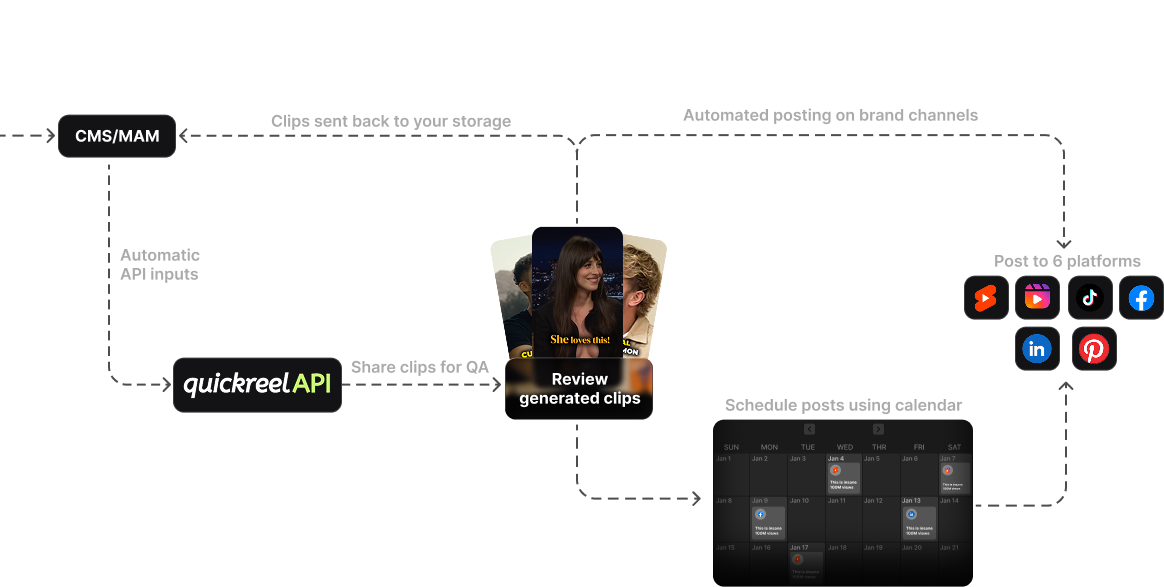
All-in-one wins switching friction outright, because the clip never leaves the tool. In a best-of-breed stack you export each clip from the clipper, re-upload it to the caption tool, export again, and re-upload to the scheduler, and you rebuild your brand template in whichever tools don't carry it. Each of those is a manual touch, paid per clip. The suite's friction cells are green because the count is zero.
Count the handoffs and the tax is obvious. A three-tool chain forces at least two file handoffs per clip plus the re-setup of caption styling and platform specs in each new tool. Multiply by your output: a team shipping five clips a week is paying that handoff tax 250-plus times a year, and that's only if you batch perfectly. None of it shows up on an invoice, which is exactly why best-of-breed buyers underestimate it.
Which model has the higher quality ceiling?
Best-of-breed has the higher ceiling at the clip and caption stages, and that's the honest case for it. A specialist clipper can push detection and reframe further than a generalist; a dedicated caption tool can offer animation styles and typographic control a suite hasn't built yet. If you need that exact ceiling, a caption look nobody else matches, a reframe model tuned to your format, best-of-breed earns its handoffs. The schedule stage is a wash, because queuing a finished MP4 to platforms is close to a solved problem in any decent tool.
Two caveats keep this fair. First, the clip-stage ceiling gap is narrower than it sounds: in my own side-by-side benchmarks, feeding the same episode to a specialist clipper and a suite surfaces a near-identical set of strong moments, so the real difference is the workflow around detection, not the raw detection (my benchmark, not a published category figure). Second, every AI clipper, suite or specialist, still produces clips that need a human pass: most auto-picks I review want a trim, a tighter end, or a weak cut dropped before they ship. The ceiling you're paying extra for is the top of the caption and reframe craft, not a hands-off pipeline. For the head-to-head on detection and edit quality, the best AI podcast clip generators, tested and the best Opus Clip alternatives in 2026 do the legwork.
When should you choose each?
Choose all-in-one unless a single stage is a hard requirement you can't compromise. The decision rule is one question: is there a stage where the best specialist is demonstrably better than the suite and it's the stage your audience judges you on? If yes, go best-of-breed there and accept the handoff. If no, most teams, the suite wins, because you feel its lower cost and zero friction every episode and the ceiling gap almost never.
- Choose all-in-one when you post regularly across several platforms, you're a solo creator or a small team, and no single stage is a make-or-break differentiator. The solo-creator setup guide lands here, and so does most of the by-workflow comparison.
- Choose best-of-breed when one stage is your edge: a signature animated-caption look your brand is known for, a reframe requirement no generalist nails, or an existing scheduler your whole org already lives in. Pay the handoff for the one stage that earns it; don't pay it for all three out of habit.
- The hybrid most teams land on: a suite for clip + caption (the two stages that chain awkwardly), plus your existing scheduler if you already run one for the rest of your social. That's one handoff instead of two, and it's a defensible middle.
Where QuickReel fits, honestly
QuickReel is an all-in-one play: it pastes a YouTube link, finds and reframes clips, captions them in 12+ styles with brand templates, and schedules across up to 30 platforms, clip, caption, and schedule in one tool, in 20+ languages (QuickReel pricing). That's the cost-and-friction half of the scorecard, by design. What it doesn't claim is the absolute caption-animation ceiling of a tool built for nothing but captions, or a reframe model tuned to one exact format. If your brand is known for a caption look no suite offers, a specialist still wins that stage, and you should use it.
The fair way to decide is to run the suite on one real episode from your own workflow and count two things: the clicks from link to scheduled post, and whether the clip and caption quality clears your bar. If the handoff savings matter more to you than the last few percent of ceiling, true for most teams, the suite is the better stack. If a single stage is genuinely your differentiator, stitch the specialist in for that one stage and let the suite handle the rest.
FAQ
Is an all-in-one clip tool worth it over separate tools? For most teams, yes. One suite that clips, captions, and schedules costs one subscription instead of three and removes the manual handoffs between tools, and you pay those handoffs on every clip, not once. Separate tools win only when one stage is a hard requirement the suite can't meet, like a signature caption look or a reframe model tuned to your format.
Is it cheaper to use one clip-and-scheduling tool or several? One combined tool is usually cheaper. A best-of-breed chain stacks subscriptions, a clipper, a caption tool, and a scheduler, and the scheduler's per-seat, per-channel pricing climbs with team size. A solo QuickReel Pro plan runs about $17.40/mo promo for the full pipeline (QuickReel pricing); an Opus-plus-Buffer equivalent for six channels is roughly $59/mo (Opus, Buffer), and that's before a separate caption tool.
What's the hidden cost of a best-of-breed clip stack? The handoffs. Exporting from the clipper, re-uploading to the caption tool, re-uploading again to the scheduler, and rebuilding your brand template in each, that's roughly four manual touches per clip, paid every time you publish. It never shows up on an invoice, which is why best-of-breed buyers underestimate it. A team shipping five clips a week pays that tax 250-plus times a year.
Does a single suite produce lower-quality clips than specialist tools? At the very top, sometimes, a specialist can push caption animation or reframe further than a generalist. But the gap is narrower than it sounds: in my own side-by-side benchmarks, a specialist and a suite surface a near-identical set of strong moments from the same episode, so the real difference is workflow, not detection. And every AI clipper, suite or specialist, still needs a human review pass, most of mine want a trim or a weak cut dropped before they ship. The ceiling you pay extra for is craft, not a hands-off pipeline.
What's the best hybrid stack? A suite for the clip and caption stages, the two that chain awkwardly between tools, plus your existing scheduler if your org already runs one for the rest of its social. That's one handoff instead of two, keeps the stages that need the same brand template together, and lets you reuse a scheduler you've already paid for. It's the defensible middle most teams land on.