
Talking With Your Hands Without Leaving the Webcam Frame


If you talk with your hands, keep them in one place the webcam can see: a small zone under your chin, between your shoulders, held back near your chest, not reaching toward the lens. A tight crop only shows chin to mid-chest, so big sideways gestures fly out the edges and any swipe toward the camera balloons into a blurry blob. Shrink the movement, keep it close to your body, and your natural energy survives the frame instead of fighting it.
You do not have to stop gesturing. Suppressing it makes you stiffer, and most expressive talkers go flat the second they pin their hands down. The job is to relocate the gesture into the part of the picture that stays in shot, and that part is smaller and shallower than people guess. This matters more every year: 53% of new US weekly listeners now say they prefer to watch a podcast, up from 30% in April 2022 (Backlinko). On a video show, your hands are on the record.
Where do you put your hands so they stay in frame?
Put them in the gesture zone: a box from your collarbone up to your chin, no wider than your shoulders, held at your chest plane rather than pushed toward the camera. A standard webcam crop shows chin to mid-chest, so anything below your collarbone, wide of your shoulders, or close to the lens leaves the picture.
Gesture inside that small box and you read as animated without ever flying off the edge.
The trap is that a normal, healthy conversational gesture lives at waist or hip height, below the frame entirely on a tight shot. So your real choice is not "hands or no hands." It is raise the whole gesture up into the visible zone, or raise your seat (or lower the camera) so the zone covers more of where your hands already are. Either works. Pick the one you can set up in thirty seconds before recording.
Why does moving your hand toward the camera look so bad?
Because a webcam lens is wide and close, so depth distorts hard. A hand that travels toward the lens grows out of proportion, goes soft as it leaves the focus plane, and for a frame or two it can blot out your whole face. The fix is to gesture across your body, at the chest plane, instead of toward the camera.
Keep the motion roughly parallel to the screen and it stays sharp and human-sized.
This is the part nearly every guide on hand gestures misses. People think of the frame as a flat rectangle and forget the third axis: how near or far the hand is from the lens. The classic offender is what I call the lens swipe, an enthusiastic "let me make this point" hand that lunges forward and balloons. On a phone-shaped clip it is the single most distracting thing a guest does, and it is a magnet for an unflattering freeze-frame thumbnail. Anchor your gestures back near your chest and the depth problem disappears.
How do you gesture naturally without overthinking it?
Give your hands a home base and a small vocabulary. Rest them lightly clasped or open at your chest; to emphasize a point, lift them a few inches into the gesture zone, make the move, then return to base. That return stops the constant low-level fidget and makes each gesture read as deliberate.
You are not performing a script, you are giving your hands somewhere to live between points.
Four moves cover almost everything a talking head needs, and all four stay inside the zone:
- The count. Listing two or three things? Hold up fingers at chest height. It is legible on a tiny clip and it paces you.
- The weigh. Comparing two ideas? Two open palms, one slightly higher, at the chest. Reads instantly without words.
- The frame. Defining something specific? Hands shape a small box in front of your sternum. Keep it small, a shoulder-width "frame" leaves the shot.
- The open palm. Inviting, agreeing, softening a take? One open hand turned up, lifted briefly. The friendliest gesture on camera and the safest.
Do not try to choreograph these mid-conversation. Pick one, practice it once before you record, and let the rest happen. If pinning your hands down makes you talk like a robot, that is a sign you are a hands talker, relocate the energy, don't kill it. A quick warm-up before you hit record loosens the shoulders so your gestures don't come out clenched, and our guide to looking confident as a first-time guest covers the settle-in routine that takes the edge off.
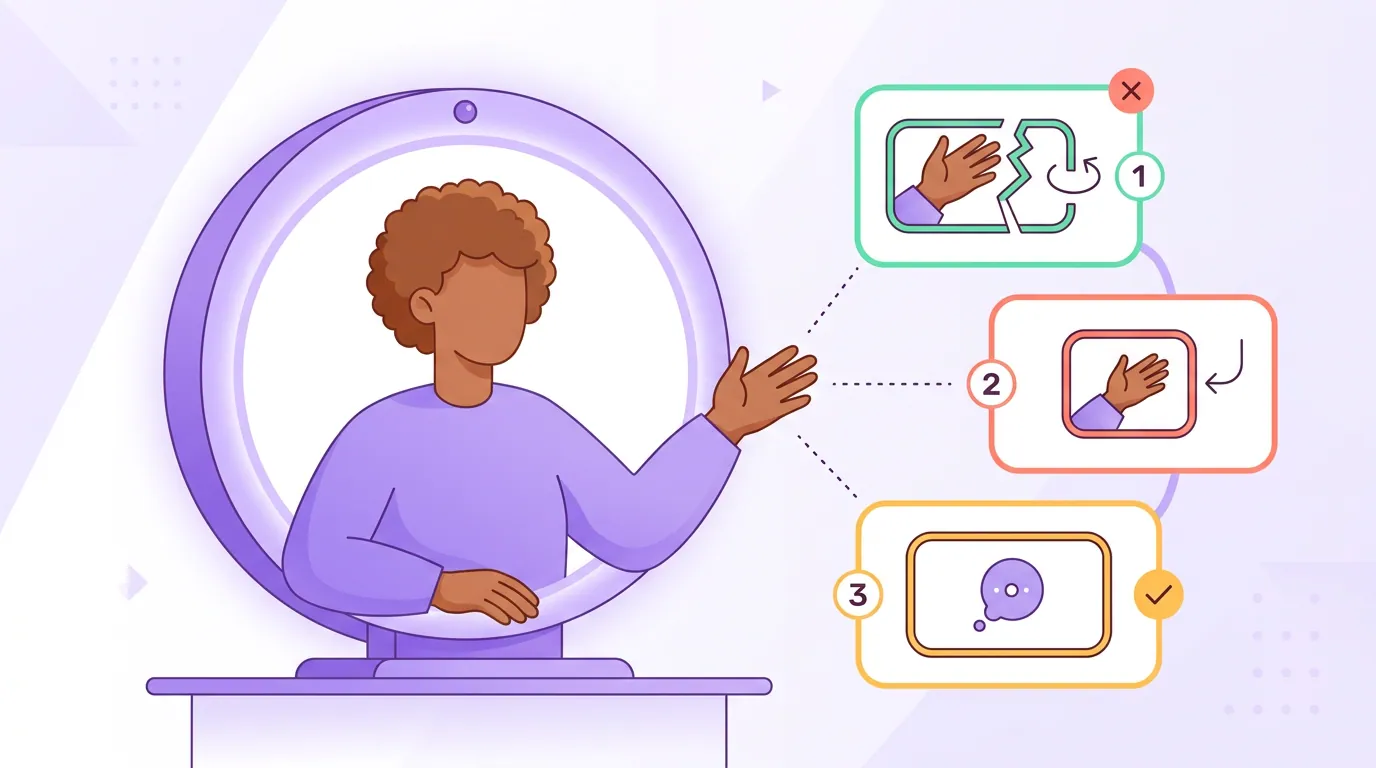
The three-fix rule for a gesture that leaves the frame
When a gesture goes wrong on a tight crop, it fails in one of three directions, and each has a different fix. Diagnose the direction, apply the matching fix, and you stop guessing. This is the rule I run through with a guest in the minute before we record.
Common mistakes (and the fix)
| Mistake | Why it hurts on a webcam | The fix |
|---|---|---|
| The lens swipe | Hand balloons and blurs toward the camera | Gesture across at the chest plane, not forward |
| Gesturing at the waist | Hands sit below a chin-to-chest crop | Lift the gesture into the zone, or raise your seat |
| Shoulder-wide spreads | "This big" gestures fly past the edges | Keep gestures inside shoulder width |
| Pinning hands flat | Kills the energy of a hands talker; you stiffen | Give hands a chest-height home base, return between points |
| Constant micro-fidget | Reads as nervous on a tight, magnified shot | One gesture per point, then rest |
| Camera below eye level | Tilts the frame so hands fall out the bottom | Raise the lens to your eyeline |
Most of this is set before you say a word: ask the host how tight your shot is, raise the camera to eye level, and decide where your hands will rest. For the wider picture, posture, lean, and how a wide studio shot changes everything, our companion guide on body language for video podcasts goes deeper on the frame itself. And because steady hands and a steady gaze go together, the breakdown of where to look on a video podcast pairs naturally with this; if your hands go quiet but the "ums" creep in, the filler-word fixes here help.
FAQ
How do I stop my hands going out of the webcam frame? Keep gestures in a small zone under your chin and inside your shoulders, held back at your chest rather than reaching toward the lens. A tight crop shows chin to mid-chest, so waist-height and shoulder-wide gestures leave the picture. Lift the gesture up, narrow it, or raise your seat so your hands and face share the frame.
Is it bad to talk with your hands on camera? No, it makes you look engaged and helps you think. The problem is only location, not the gesturing itself. On a tight webcam shot, relocate the movement into the visible zone and keep it inside shoulder width. Suppressing your hands usually makes you stiffer and flatter, which reads worse than a gesture that stays in frame.
Why do my hands look huge or blurry on video? Because they are moving toward the lens. A close, wide webcam distorts depth, so a hand pushed forward grows out of proportion and goes soft as it leaves the focus plane. Gesture across your body at the chest plane, parallel to the screen, and your hands stay sharp and normal-sized.
Where should my hands rest between gestures? At a chest-height home base, lightly clasped or open in front of your sternum, inside the frame. Returning there between points stops the constant fidget and makes each gesture read as deliberate. Resting hands in your lap puts them below a tight crop, so they vanish until they pop up mid-gesture.
Does this matter if the podcast is mainly audio? For the audio file, no. But the filmed version is what becomes clips, and the first three seconds of a clip decide whether it gets watched (castmagic). If the show posts any video clips, a lens swipe or a chopped-off gesture is exactly the kind of moment that lands in a feed.