
Clip Tools for YouTubers Repurposing Long Videos

For a YouTuber repurposing long videos, the best clip tool is the one that helps Shorts feed your long-form channel, not just the one that pumps out the most verticals. A clip that earns a million Shorts views and zero subscribers is a dead end on YouTube. On that test, QuickReel, Opus Clip, and 2Short lead, and which one fits comes down to whether you want scheduling in one place, virality scoring, or a tight YouTube-URL workflow.
This is a different buying question than a podcaster faces. A podcast clipper optimizes for finding spoken moments in audio. A YouTuber is already on the platform the clips live on, and the platform treats Shorts and long-form as two separate algorithmic ecosystems, a structural change YouTube made in 2024 that most creators still underweight (Subscribr). So the tool's job is not "make clips." It is "make clips that route attention back to your real videos."
Why the YouTube buyer is different
YouTube is the one platform where your clips and your source content live under the same channel. That changes three things a podcast-clipper comparison never has to weigh: where the clip's value actually lands, how chapters can drive selection, and whether reuploading your own footage is safe.
Start with where the value lands. 74% of Shorts views come from non-subscribers (Zebracat, via Loopex Digital, May 2026). Shorts is a discovery surface that shows your face to strangers. But a Shorts view and a long-form view are not worth the same, not for the algorithm, and not for your wallet.
What "best" means for a YouTuber, the conversion test
The metric that separates a good YouTube clip tool from a clip factory is whether it supports the Shorts-to-long-form loop: a clip that pulls a stranger in, then points them at the full video. That loop is where the money is. Long-form YouTube RPM runs roughly $3–$12 per 1,000 views for most channels, while Shorts RPM sits at $0.01–$0.07, a gap that runs from roughly 40× at the low end to well over 1,000× at the extremes (AIR Media-Tech, 2026; Loopex Digital, May 2026).
Here is the honest caveat the view-count crowd skips: Shorts viewers do not migrate to your long-form automatically. Because the feeds run as separate ecosystems, a viral Short does not push your full videos to those viewers unless they signal interest (Subscribr). You engineer the bridge, with a hook that promises the full story, a pinned-comment link, and an end frame that names the long video. Channels that run both formats together grow about 41% faster than single-format channels (Awisee, via Loopex Digital, May 2026). The tool can't do the bridge for you, but it can make the loop cheap enough to run every week.
The verdict: who should pick what
Moment-detection quality has largely converged across the major AI clippers, paste the same episode into QuickReel, Opus Clip, and 2Short and they surface a heavily overlapping set of candidate clips. For a YouTuber, the differentiator is the workflow around the clip: pasting a YouTube URL, scheduling the post, and keeping the loop back to long-form cheap. Here is the short version.
- Pick QuickReel if you want to paste a YouTube link, get captioned verticals, and schedule them across platforms without leaving the tool, at the lowest entry price.
- Pick Opus Clip if a virality score is how you decide which clips deserve a full-video CTA, and you'll pay for the Pro editor.
- Pick 2Short if your whole workflow is YouTube-URL-to-Shorts and nothing else, and you want unlimited exports at a flat rate.
All three carry the same honest caveat: no AI clipper ships a finished Short. Every one of them hands you a draft that needs a human review pass, the hook, the captions, and the end-frame CTA are where you add the value YouTube's reused-content policy rewards. None of these tools is a hands-off button.

Side-by-side: price, YouTube workflow, and what you get
Prices verified live on 27 June 2026. SaaS pricing changes often, so re-check each vendor's page before you buy.
| Tool | Entry paid price | YouTube fit & free tier |
|---|---|---|
| QuickReel | $9/mo Starter (100 credits) | YouTube-URL upload on every tier; schedule to platforms in-tool; free signup to test |
| Opus Clip | $15/mo Starter (150 min) | Strong virality scoring; 720p on Starter, 1080p + editor Pro-gated at $29; free tier watermarked, 3-day expiry |
| 2Short | $9.90/mo Lite (60 min exports) | Built around YouTube-URL → Shorts; unlimited exports from $19.90 Pro; free Starter limits exporting |
| Vizard | ~$14.50/mo annual Creator | Multilingual clipping; full editor on free tier; free 60 credits/mo at 720p + watermark |
Sources: QuickReel pricing; Opus Clip pricing, plans/credits and eesel AI breakdown; 2Short and Creatify review; Vizard pricing and EzUGC breakdown.
Two numbers on that table matter for a YouTuber specifically. First, all four meter by source minutes (1 credit ≈ 1 minute of input), so a 45-minute upload eats credits fast on the smallest plans, a back-catalogue clip-out will blow past 100 credits in two videos. Second, 1080p is gated on Opus Clip's $15 Starter; for YouTube Shorts, where competitors post crisp 1080p, that 720p ceiling is a real handicap until you reach the $29 Pro tier (eesel AI).
The honest section on each tool
QuickReel, lowest entry price, scheduling built in
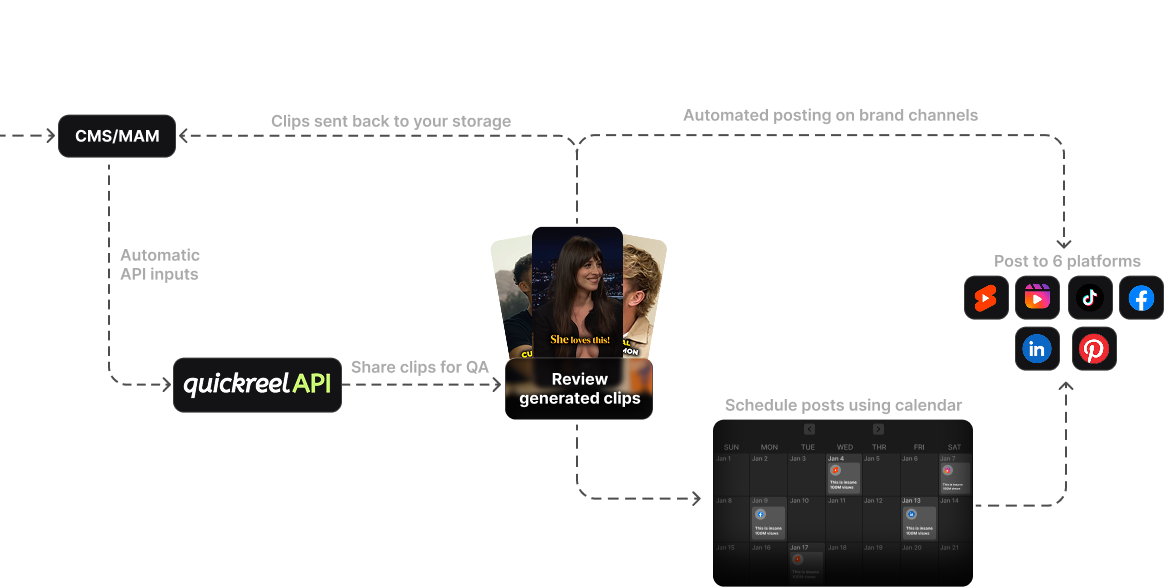
QuickReel takes a YouTube URL, returns captioned vertical clips, and lets you schedule them out without exporting and re-uploading elsewhere, the step a YouTuber's weekly loop leaks the most time on. Starter is $9/mo for 100 credits, with Pro at $29/mo (250 credits, 6 platforms, often promoted around $17.40), Pro+ at $49/mo (500 credits, 2 seats, 10 platforms), up to Ultimate at $259/mo (1,000 credits, 10 seats, 30 platforms, currently discounted to about $89) (QuickReel pricing). It supports 20+ languages and 12+ caption styles, and YouTube upload is on every tier.
What it is not: a frame-accurate timeline editor or a virality oracle. If you want a score that ranks your fifteen clips before you choose, Opus does that more explicitly. And QuickReel's clips, like every AI tool's, need a review pass, the caption check and the end-frame CTA that points back to your long video. The honest pitch is that it removes the most steps between a YouTube URL and a scheduled clip for the least money, not that it edits like a pro suite.
Opus Clip, best if a virality score drives your CTA decision
Opus Clip's edge for a YouTuber is its virality scoring: it ranks the clips it finds, so you spend your attention building a strong full-video CTA on the top three instead of all fifteen. That is genuinely useful when your goal is conversion, because you want to invest your hook-writing where the reach will land. The catch is structural and matters on YouTube, the editor, AI hook, and B-roll are Pro-gated at $29/mo, and the $15 Starter caps exports at 720p, below the 1080p that Shorts viewers expect (Opus Clip pricing; eesel AI). The free tier is a real permanent tier, but it watermarks clips and they expire after three days. Opus is the most polished clip-finder here; it is also the one most likely to push you to $29 to get 1080p and an in-tool editor.
2Short, best if your entire workflow is YouTube-URL-to-Shorts
2Short is built tightly around one path: paste a YouTube URL, get Shorts. For a creator who only repurposes their own long videos and never touches other source types, that focus is a feature. Lite is $9.90/mo with 5 hours of analysis and 60 minutes of exports; unlimited exports start at the $19.90 Pro tier, and exports are 1080p with no watermark across paid plans (2Short; Creatify review). Where it costs you touches: it leans on existing captions and facial tracking, so when the auto-captions need correcting you do that work, and it has no in-tool scheduler, you export, then upload to YouTube Studio yourself. Narrow and competent. If you want one tool that also schedules and clips other sources, look elsewhere.
Vizard, best free tier and multilingual reach
Vizard is the value play if you publish in more than one language or want a generous free run before paying. Its free plan includes 60 credits a month plus full access to the video editor, where Opus gates editing behind Pro (Vizard pricing; EzUGC). The free tier caps you at 720p with a watermark and 3-day storage, so it is a proper trial rather than a home. Paid Creator lands around $14.50/mo on annual billing (roughly $29–30 monthly without the annual discount; review sites vary, so verify on the page). For a YouTuber who clips in several languages, Vizard is the safest starting point here.

Chapter-aware clipping and thumbnail moments, the YouTube-native edge
Two YouTube-native habits make any of these tools work harder, and they're worth building into your selection criteria.
Use your chapters as clip boundaries. If you already chapter your long videos, and you should, for retention, each chapter is a pre-segmented, self-contained clip candidate. Instead of asking the AI to scan a 45-minute blob, you can point it at the three chapters you know carry a standalone idea. The tools don't formally import YouTube chapter markers yet, but you feed them the timestamps; chaptering your source is the cheapest way to make clip selection deliberate instead of random.
Pick the thumbnail moment, not the loudest moment. On YouTube, the first frame of a Short is effectively its thumbnail in the feed. A clip that opens on a mid-blink, mid-word frame loses the swipe before the hook lands. In your review pass, the single fix that pays the most is choosing a strong opening frame, a clear face, an expression, a readable caption, over the moment the tool defaulted to. That one touch moves three-second view rate more than any caption style.
Reuploading your own footage without strikes, the question YouTubers actually ask
Here is the worry that's specific to this buyer: "If I cut Shorts from my own long video and post them on the same channel, will I get a copyright strike?" The short answer is no, you own your footage, and the copyright-strike system targets unauthorized use of other people's material, not your own (YouTube Help: copyright strikes). Reposting your own content to your own channel does not strike you.
Two real risks remain, and a clip tool can either help or hurt with each:
- Licensed music inside your long video. If your full video used music cleared for long-form but not for Shorts, that audio can be claimed in the Short. Shorts over 60 seconds containing claimed audio get blocked, not just demonetized. When you clip, watch which segments carry music, and keep music-heavy moments under 60 seconds or swap to cleared audio.
- The reused-content and inauthentic-content monetization policies. YouTube does not strike low-effort repurposing, but it can rule a Short ineligible for monetization if it reads as mass-produced, templated, or near-duplicate with nothing added, YouTube renamed the "repetitious content" policy to "inauthentic content" in July 2025 to make that explicit (YouTube channel monetization policies). The fix is exactly the work the tool helps you do quickly: a fresh hook, real captions, a tighter cut, and a CTA back to the long video. That added value keeps the Short eligible, and it's the same work that drives conversion. Virality without it is empty engagement, and views are not subscribers.

The decision rule
If you run a weekly channel and your real goal is to keep the Shorts-to-long-form loop running without losing a day to it, take the green path: lowest entry price plus scheduling in one place. If you want a score to tell you which three clips deserve your best CTA, Opus earns its $29 tier, just budget for Pro, since the 720p Starter undersells your channel. If you only ever paste YouTube URLs and want a flat unlimited-export price, 2Short's $19.90 Pro is the tight fit. And if you clip in more than one language, Vizard's free tier is the place to start.
FAQ
What is the best free clip tool for a YouTuber? Vizard's free tier is the most generous among the major AI clippers, 60 credits a month plus full editor access, capped at 720p with a watermark (Vizard pricing, verified 27 Jun 2026). Opus Clip's free tier is also permanent but clips expire after three days and carry a watermark. For testing the loop on your channel, either works before you pay.
Will I get a copyright strike for cutting Shorts from my own long video? No. You own your footage, and copyright strikes target unauthorized use of other people's material, not your own content on your own channel (YouTube Help). The two things to watch are licensed music that was cleared for the long video but not for Shorts, and YouTube's reused-content monetization policy, both are solved by adding a fresh hook, real captions, and a tighter cut.
Do Shorts viewers actually become long-form subscribers? Not automatically. Since 2024 YouTube runs Shorts and long-form as separate algorithmic ecosystems, so a viral Short does not push your full videos to those viewers on its own (Subscribr). You engineer the bridge with a hook that promises the full story, a pinned-comment link, and an end frame naming the long video. Channels running both formats grow about 41% faster (Loopex Digital, May 2026).
Which clip tool keeps Shorts at full 1080p? QuickReel, 2Short (paid), and Vizard (paid) export at 1080p; Opus Clip caps its $15 Starter at 720p and reaches 1080p only on the $29 Pro tier (eesel AI, verified 27 Jun 2026). For Shorts, where the feed is full of crisp verticals, 720p is a visible handicap, so weigh that against Opus's virality scoring.
How many clips should a YouTuber make per long video? Treat each chapter as one clip candidate and aim for the three to five that carry a standalone idea, not the maximum the tool will generate. Volume without a CTA back to long-form just feeds the low-RPM Shorts feed. The win is fewer, sharper clips that each route attention to a full video.
What to pick if you run a weekly channel
Rank by the loop, not the view count. The clip tool that wins for a YouTuber repurposing long videos is the one that makes the Shorts-to-long-form conversion cheap to run every week, because on YouTube, a Short's value is the subscriber it sends to your real videos, not the cents its own views earn. On that test, QuickReel leads on price and built-in scheduling, Opus Clip on virality-scored selection (budget for the $29 Pro tier to clear 720p), and 2Short on a tight URL-only workflow. All of them hand you a draft, not a finished Short, the hook, the captions, and the end-frame CTA that closes the loop are still your work.
For the niche-specific picks, our companion roundup ranks the best clip tools for YouTube Shorts, and if your workflow starts from a link, see the best tools to clip from a YouTube URL. For the broader field, start with the best AI podcast clip generators and the best Opus Clip alternatives. If you're a one-person channel, the solo creator clip-tool setup ranks by hands-on touches; if you run a team, what multi-seat teams should compare covers seats and review workflows.